# Welcome

## **Elevate your medical practice**

Whether you're looking to refine your skills, start with essential basics, or dive deep into our innovative Neoflix program, you've come to the right place. Our documentation is tailored to help healthcare professionals, educators, and administrators enhance their impact in medical settings through continuous learning and effective practices.

<table data-view="cards"><thead><tr><th></th><th></th><th></th><th data-hidden data-card-target data-type="content-ref"></th></tr></thead><tbody><tr><td></td><td><p><mark style="color:blue;"><strong>Who is this for?</strong></mark></p><p>Curious if this is for you? This section is designed to help you quickly determine whether the content will serve your needs.</p></td><td></td><td><a href="/welcome/who-is-this-for">Who is this for?</a></td></tr><tr><td></td><td><p><mark style="color:blue;"><strong>Quick-start</strong></mark></p><p>Ready to jump right in? Our Quick-start guide is here to help you hit the ground running</p></td><td></td><td><a href="/welcome/quick-start">Quick-start</a></td></tr><tr><td></td><td><p><mark style="color:blue;"><strong>Neoflix</strong></mark></p><p>Welcome to Neoflix, where we transform medical practice through the power of video review and continuous learning.</p></td><td></td><td><a href="/welcome/neoflix">Neoflix</a></td></tr></tbody></table>

*The KNAW Van Walree Fund supported the development of this website.*

<figure><img src="https://1970177761-files.gitbook.io/~/files/v0/b/gitbook-x-prod.appspot.com/o/spaces%2Fn5nZuEQtMW7vjS2x309q%2Fuploads%2Fgit-blob-92e4c2d91e57b498ebda4064b4658c81614d6ef4%2FLvnYnTnCZMHXjWeeyfec5Kb2NA.webp?alt=media" alt=""><figcaption></figcaption></figure>


# Who is this for?

The Neoflix toolbox supports healthcare professionals dedicated to improving patient care through ongoing learning and analysis. This platform is designed for a range of medical practitioners:

Frontline providers, including consultants, surgeons, physicians, nurses, technicians, and trainees, can use the toolbox to refine their skills, deepen procedural knowledge, and enhance team communication. Educators and mentors will find it valuable for creating dynamic learning environments that embrace both successes and challenges as growth opportunities. Administrators and researchers can leverage the platform to optimize workflows, identify areas for improvement, and drive innovation in healthcare practices.

At its core, Neoflix aims to help medical teams worldwide enhance their clinical practice by learning directly from critical, time-sensitive moments. Video review offers several key advantages over traditional methods:

## Detailed insights <a href="#detailed-insights" id="detailed-insights"></a>

Capturing nuances often missed in written reports, video review provides a comprehensive analysis of medical events. Practitioners observe subtle non-verbal cues, spatial relationships, and action sequences unavailable in text alone. This visual data highlights opportunities for improved efficiency and communication in high-stress situations, offering valuable lessons for future scenarios.

## Enhanced reflection <a href="#enhanced-reflection" id="enhanced-reflection"></a>

Pausing and rewinding footage allows practitioners to analyze fast-paced events without real-time pressure. This detailed examination supports better decision-making by enabling objective performance assessment and identification of improvement areas. The practice leads to refined techniques, streamlined workflows, and improved patient outcomes while building resilience and problem-solving skills among medical teams.

## Improved teamwork <a href="#improved-teamwork" id="improved-teamwork"></a>

Cross-disciplinary collaboration benefits from joint review sessions where medical and nursing staff examine procedures together. Group discussions of patient care footage help identify communication gaps and develop strategies for cohesive teamwork. Regular video reviews foster a culture of open communication and continuous improvement within healthcare organizations, enhancing overall team performance.

The Neoflix platform offers an intuitive toolbox for integrating video review into team learning and improvement processes. It also facilitates research collaboration with medical centers worldwide, enabling the collective review of recordings to uncover patterns, trends, and best practices. This global network for knowledge sharing allows teams to learn from top medical centers internationally while contributing their own expertise to the broader healthcare community.

By joining the Neoflix toolbox, medical teams can access a powerful resource for elevating patient care through data-driven insights and collaborative learning.


# Quick-start

Video review is a tool for enhancing performance, promoting collaboration, and identifying areas for improvement. This quick-start guide outlines the essential steps to implement video review in your workflow.

## **Getting started**

### **1. Planning**

Define specific goals for your video review process, such as skill improvement or process efficiency. Gain support from colleagues and management by explaining the benefits and potential outcomes. Develop a clear policy addressing privacy concerns, including consent procedures and guidelines for video storage and access.

* [ ] **Set Goals:** Determine what you want to achieve with video review (e.g., skill improvement, process efficiency).
* [ ] **Secure Support:** Explain the benefits to colleagues and management to gain their buy-in. Make sure the team is prepared and have multiple meetings to explain the goal of video review to all involved providers. Make sure to inform management staff and obtain permission.
* [ ] **Address Privacy:** Draft a clear policy on consent, video storage, and access. Click [here ](https://github.com/LennartvdM/NFLX-nieuwe-structuur/blob/main/level-1-fundamentals/3.-safe-simple-and-small)for more information.

<table data-card-size="large" data-view="cards"><thead><tr><th></th><th></th><th></th></tr></thead><tbody><tr><td></td><td><mark style="color:green;">By doing this, you will gain your team's trust and be able to answer all their questions.</mark></td><td></td></tr><tr><td></td><td><mark style="color:red;">Without doing this, your team may lose trust in you and question the project's purpose. Additionally, you might not receive the necessary support from management.</mark></td><td></td></tr></tbody></table>

### 2. Pilot test

Form a pilot team of providers willing to participate in the first recordings. Select a routine, low-risk task for the initial recording to minimize pressure. Use readily available equipment like smartphones for recording, seeking technical assistance if needed.

* [ ] **Form your** [**pioneer team**](/level-1-fundamentals/2.-planning-your-initiative/2.1-pioneer-team)**.** These are providers who are involved in the video review program, willing to be the first to be recorded and who can convey the message of video review to the team.
* [ ] **Choose a Low-Stakes Task:** Start with a familiar, routine procedure for your first recording.
* [ ] **Keep Setup Simple:** Use a smartphone or enlist tech help if needed.
* [ ] **Watch and Learn:** Review the video with those involved, focus on positives, and identify areas for growth.

<table data-card-size="large" data-view="cards"><thead><tr><th></th><th></th><th></th></tr></thead><tbody><tr><td></td><td><mark style="color:green;">With this approach, you'll gain permission more easily, avoid expensive equipment costs, and immediately see the positive impact of video recording.</mark></td><td></td></tr><tr><td></td><td><mark style="color:red;">If you don't do this, your team members might become anxious, decline participation, you will invest time and money in complex equipment, and might leave providers feeling negative about the experience.</mark></td><td></td></tr></tbody></table>

### **3. First review session**

Establish feedback rules to maintain a safe learning environment. Focus on specific behaviors and situations without personal judgments. Begin the session by emphasizing the learning objectives and thanking participants. Guide the discussion to draw insights from the video, and conclude by summarizing key takeaways.

* [ ] **Feedback rules:** The most important part of organizing video review, is maintaining the safe learning environment.
  * You can enhance this by using feedback rules, i.e., be specific and to the point, focus on behavior and do not make it personal, describe the situation without judgement.
* [ ] **Set a Positive Tone:** Emphasize learning and improvement in a supportive space.
* [ ] **Thank Participants:** Acknowledge the value of those who agreed to be recorded.
* [ ] **Facilitate Discussion:** Guide participants to share insights from the video.
* [ ] **End with Takeaways:** Summarize key learnings.

<table data-card-size="large" data-view="cards"><thead><tr><th></th><th></th><th></th></tr></thead><tbody><tr><td></td><td><mark style="color:green;">You'll create a structured session for participants to safely express their views, providing concrete areas for improvement that you can immediately act upon.</mark></td><td></td></tr><tr><td></td><td><mark style="color:red;">Without careful planning of your first review session, you risk receiving judgmental feedback, making recorded providers feel unappreciated, leading to poorly guided sessions, and creating uncertainty about how insights will be used.</mark></td><td></td></tr></tbody></table>

### **Reflect and expand**

After the initial session, gather feedback from participants on the effectiveness of the review and their experience with the process. Use this input to refine your approach and develop guidelines for a broader implementation of video review.

* [ ] **Get Team Feedback:** Evaluate the session's effectiveness by making an overview on lessons learned and identified areas for improvement. Ask for your team's feedback on the session, on what they learned from the session and how they experienced the safe learning environment.
* [ ] **Build Your Program:** Based on the pilot and your team's feedback, develop guidelines and expand your video review program.

<table data-card-size="large" data-view="cards"><thead><tr><th></th><th></th><th></th></tr></thead><tbody><tr><td></td><td><mark style="color:green;">This approach allows your team to provide feedback and share experiences, enabling you to tailor the video review program for a better fit within your department.</mark></td><td></td></tr><tr><td></td><td><mark style="color:red;">Without taking the time to refelec,t you risk silencing team feedback and experiences, potentially creating a misaligned setup, and jeopardizing team buy-in.</mark></td><td></td></tr></tbody></table>

## **A few more tips**

#### **Initiating the process**

At first, start with brief recordings of basic tasks. This approach allows for manageable analysis and gradual skill development.

#### **Constructive feedback**

Focus on identifying and reinforcing positive aspects of performance. While addressing areas for improvement, maintain a balanced perspective that acknowledges existing competencies.

#### **Creating an analytical environment**

Establish a framework that encourages open discussion and reflection. Implement specific [feedback protocols](/level-2-in-action/11.-lets-neoflix/11.3-tasks-of-the-chair) to ensure all participants feel comfortable sharing insights and receiving critiques.

Developing participants' understanding of video review practices is crucial. The provided [FAQs](/welcome/quick-start/faqs) serve as a valuable resource for this purpose. Reviewers and subjects alike should familiarize themselves with these materials to enhance the effectiveness of the review process.

As the review program progresses, consider gradually increasing the complexity and duration of recorded tasks. This approach allows for a more comprehensive assessment of skills and promotes continuous improvement over time.

See also [How it works](/welcome/neoflix/how-it-works):

* [LEVEL 1: Fundamentals](https://github.com/LennartvdM/NFLX-nieuwe-structuur/blob/main/welcome/quick-start/broken-reference/README.md)
* [LEVEL 2: In action](https://github.com/LennartvdM/NFLX-nieuwe-structuur/blob/main/welcome/quick-start/broken-reference/README.md)
* [LEVEL 3: Growth](https://github.com/LennartvdM/NFLX-nieuwe-structuur/blob/main/welcome/quick-start/broken-reference/README.md)


# FAQ's

<details>

<summary>General</summary>

**What happens if a mistake is recorded?**

* **Answer:** Mistakes should be reported regardless of video evidence. Clarify your hospital's incident reporting protocols. Regarding legal use of the video, consult legal experts as regulations vary by region. Emphasize that the video's primary purpose is for internal learning and quality improvement and recordings are not used for any other purpose. The [NICU at LUMC](https://github.com/LennartvdM/NFLX-nieuwe-structuur/blob/main/level-1-fundamentals/4.-learning-from-success-stories#nicu-lumc) has made video recordings of resuscitation procedures a standard part of care and also part of the patient file, so these videos are visible to patients.

**How do you make it GDPR compliant?**

* **Considerations:** GDPR is specific to the EU. Adapt answers based on your location's privacy laws.
* **Answer:** Explain the purpose (quality improvement), how the video will be used, data security measures, and their rights (access, deletion). Obtain written consent. Consult your hospital's legal/data protection officer if needed.

**What if there's not enough time to ask patients for consent?**

* **Considerations:** Emergency situations complicate consent. Laws allow for exceptions, but consult legal advisors or an ethics committee on your region's specific rules.

**Can parents see or have the video? How do you ensure they won't post it everywhere?**

* **Considerations:** This may vary based on regulations and consent specifics. For example, in [neonatal care, parents value the review of a recording](https://lennartvandermolens-organization.gitbook.io/overig/summaries-articles/dive-in-the-history-of-video-review-in-our-nicu).
* **Answer:** Discuss parental access with your team. If permitted, have clear usage agreements covering distribution and social media restrictions, while emphasizing the risk of de-identification failure.

**How do you ask healthcare workers for consent?**

* **Answer:** We would recommend [to emphasize voluntary participation](/level-1-fundamentals/3.-safe-simple-and-small/3.1-safe), explain the benefits, outline video usage (quality improvement, not performance evaluation), and give them control: consent to film, consent to review, consent to use in *Neoflix*.

</details>

<details>

<summary>Implementation</summary>

**How do you involve nurses?**

* **Answer:** [Schedule video reflection](https://github.com/LennartvdM/NFLX-nieuwe-structuur/blob/main/level-1-fundamentals/2.-planning-your-initiative) around nursing shifts and accommodate their input in the process.

**What kind of equipment do you use? Can you also use additional signals (CTG, respiratory parameters, etc.)?**

* **Answer:** Start [simple](/level-1-fundamentals/3.-safe-simple-and-small/3.2-simple) (phone for practice), progress to dedicated cameras (GoPro). For syncing other signals, you'd likely need specialized software/hardware – this is an area for technical exploration.

**What can be challenging in rolling out/implementing this project?**

* [**Getting the team to turn on a camera**](https://github.com/LennartvdM/NFLX-nieuwe-structuur/blob/main/level-2-in-action/6.-recording-equipment)**:** At some point, this becomes more automatic, but it remains an extra step providers have to take in what is sometimes an "acute" setting,

**How do you store the videos?**

* **Answer:** Secure data storage compliant with healthcare regulations and your hospital's IT policies. Specify encryption and access controls.

**How do you inform a team when setting up Neoflix?**

* **Answer:** Be [transparent about goals, benefits, and the emphasis on non-judgmental learning](/level-1-fundamentals/2.-planning-your-initiative/2.2-gaining-team-buy-in). Start small, get early wins, and build enthusiasm.

**How much does it cost?**

* **Answer:** Break down costs: equipment (cameras, editing software), personnel time (coordination, reflection sessions), possible IT integration. Seek possible grants or funding sources within your hospital.

**How do you ensure a team films videos? Who picks up the camera? How do you start?**

* **Answer:** [Team leaders model enthusiasm and initiate recordings](/level-1-fundamentals/2.-planning-your-initiative/2.1-pioneer-team). Make the process easy with clear instructions.

**How can you set up and expand video review? At what pace?**

You can [expand video review](/level-3-growth/17.-continuous-improvement) at the pace of the healthcare workers. It's important not to make them feel like it's being imposed on them. If they see the value themselves, they will naturally become enthusiastic and come up with their own ideas that can be used to implement video reflection.

</details>

<details>

<summary>Video review</summary>

**Who guides video review?**

* **Answer:** The[ chair](/level-2-in-action/11.-lets-neoflix/11.3-tasks-of-the-chair) of the video review session. Representatives from all disciplines lead to more comprehensive discussions. Train them in facilitation and constructive feedback.

**How do you edit videos to make them usable for video reflection? How do you ensure integration with software?**

* **Answer:** Basic [editing](/level-2-in-action/9.-after-the-intervention/9.2-simple-video-editing) is possible with many software options. For advanced features, a dedicated video editing suite might be needed. Integration with patient monitoring systems would need custom programming.

**How do you organize video reflection in a way that is safe and effective?**

* **Answer:** Organizing video review with regards to the [safe learning environment](/level-2-in-action/11.-lets-neoflix/11.2-a-safe-learning-environment) included clear feedback rules (specific, non-judgmental), skilled chairperson to guide discussions, time management, and focused preparation for each video segment.

**How do you use video reflection to improve quality (effectiveness)?**

* **Answer:** [Identify actionable insights from discussions, develop and implement improvement plans, track changes or outcomes to evaluate success.](/level-2-in-action/12.-improving-care-through-the-neoflix-approach)

**Can you perform multi-center video reflection without feeling judged?**

* **Answer:** Yes, with thorough preparation, ground rules, and a facilitator focused on collaborative learning, not criticism. Consider that a mistake as something that doesn't work and has reasons that can potentially be addressed. Or better yet, why does it usually go well? And [from that perspective, look at why something goes wrong.](/level-1-fundamentals/1.-preproduction/1.1-beyond-the-procedure#taking-a-different-approach)

**How do you keep video reflection running?**

* **Answer:** Shared ownership (multiple team leaders), streamlined processes, celebrating successes.

**What are the dangers of video reflection?**

* Blame culture. Focusing too much on perfect execution. Micromanaging. Emphasize that it's about learning how this team, in this context and in this situation, acts and makes choices. Consider: is there variation in how something could have been done, what factors influence the course of the situation, etc.?

</details>

<details>

<summary>NICU LUMC specific</summary>

[Click here](/welcome/neoflix/streamlining-neonatal-care-a-success-story) for more information.

**How many videos have you recorded in total?**

* We expanded the Neoflix project in August 2021 with identifiable images.
* Since then, we have had 58 Neoflix episodes in about 2 years.
* In total, we have recorded 113 videos of 9 different procedures, and we are still counting.

**How do you analyze the data?**

* The videos are pre-discussed with those involved and then shown in a *Neoflix* session. There, we evaluate the procedure in the video with the healthcare providers. Our project focuses on the Neoflix discussions. So we note what is said there, what points are raised, and how we can use that to make quality improvements. We then carry out action research (Plan-do-check-act) to improve quality and to see if it has had an effect. My research also focuses on action research and qualitative interview research.

**Is there currently a form of privacy/protection for the filmed employees?**

* The choice to be filmed is voluntary. Providers can also decide individually whether a video will be used in Neoflix.

**Could there be any rights attached to these videos?**

* We will delete the videos after the project. Before that, anyone can refuse to have a video used in Neoflix. We do not know whether they can be used in legal cases. This has also never happened since video reflection started in 2014.

**Where/in what situations do you see or expect the most added value of Neoflix?**

* In acute or (neonatal) intensive care, it is difficult to reflect on complex/acute procedures, although they have a lot of influence on the patient or patient outcomes. Debriefing or evaluation of these moments is often limited by incomplete documentation or by recall bias (not being able to remember an event from the past well).
* Recording care and discussing videos with healthcare professionals among themselves allows them to reflect on care exactly as it is, in complete transparency. In addition, healthcare professionals also have the opportunity to learn from each other, something that is becoming less and less possible as healthcare professionals become more experienced. Video reflection gives healthcare professionals the opportunity to gain new insights to improve quality of care.

</details>


# Neoflix

Video review is a valuable tool for healthcare professionals to improve their practice and enhance clinical care. Some may hesitate due to concerns about high-stakes recordings, but starting with a low-pressure approach can ease the transition.

Begin by focusing on routine procedures. Even familiar tasks can reveal patterns and habits that may benefit from refinement upon review. This approach allows healthcare providers to gain insights from everyday activities without adding undue stress.

## **Building trust and consent**

Building trust is crucial for effective video review implementation. Obtain informed consent from providers, emphasizing that the process aims to foster collaborative learning rather than individual criticism. Develop secure protocols for handling sensitive video data, and consider offering options for footage removal after review. These measures can help encourage open participation and alleviate concerns about privacy or judgment.

Even a brief test recording can yield surprising insights. Healthcare teams often discover areas for improvement that were not apparent during the actual procedure or interaction. This self-reflection can lead to meaningful enhancements in patient care and team dynamics.

For those interested in implementing video review, a comprehensive Quick-Start guide can provide the essential information needed to begin. This guide typically covers technical setup, best practices for recording, and strategies for conducting productive review sessions.

## **Benefits of video review**

Video review offers numerous benefits for medical teams. It allows for detailed analysis of clinical techniques, communication patterns, and team coordination. By reviewing recordings, healthcare professionals can identify both strengths and areas needing improvement in a way that real-time observation alone may miss. This process can lead to standardization of best practices, enhanced patient safety, and more efficient workflows.

Additionally, video review serves as an excellent teaching tool. Junior staff can learn from observing experienced colleagues, and seasoned professionals can refine their skills through self-assessment. This collaborative learning environment fosters a culture of continuous improvement and can contribute to better patient outcomes.


# Make every clinical encounter a learning opportunity

Modern medicine operates under intense time constraints, with medical and nursing staff facing overwhelming demands. Critical care scenarios, such as heart attack interventions, emergency intubations, or given our background; neonatal resuscitations. These require precise coordination and teamwork under high-pressure conditions. These situations place significant strain on healthcare professionals, making it challenging to consider additional tasks or processes.

## The potential of video review <a href="#the-potential-of-video-review" id="the-potential-of-video-review"></a>

Video review of medical procedures offers a method to optimize existing workflows while improving patient care. In critical moments, important details can be overlooked. While post-event debriefings are valuable, they rely on fading memories and may miss subtle aspects of team dynamics or potential near-misses. Additionally, experienced healthcare providers often have limited opportunities to observe and learn from their colleagues' practices.

Recording and reviewing crucial medical moments allows for careful analysis of existing practices and identification of improvement areas. This process focuses on refining techniques and uncovering insights that might otherwise remain unnoticed, rather than highlighting errors.

## Implementing video review in medical settings <a href="#implementing-video-review-in-medical-settings" id="implementing-video-review-in-medical-settings"></a>

Tools like the Neoflix toolbox facilitate the implementation of video review in medical settings. These systems are designed to prioritize patient and staff privacy while integrating efficiently into busy healthcare environments. They can also connect users with a broader community of medical professionals for shared learning and development.

Video review in medicine has the potential to optimize workflows, reduce cognitive load on healthcare providers, and improve patient outcomes. By providing a means to analyze and refine critical procedures, this approach offers a pathway for continuous improvement in medical practice without adding undue burden to already strained healthcare systems.


# Streamlining neonatal Care: a success story

## Neonatal Intensive Care Video Review: A Case Study from Leiden University Medical Center <a href="#neonatal-intensive-care-video-review-a-case-study-from-leiden-university-medical-center" id="neonatal-intensive-care-video-review-a-case-study-from-leiden-university-medical-center"></a>

The neonatal intensive care unit (NICU) at Leiden University Medical Center (LUMC) implemented video recording and review processes to enhance patient care and team performance. This case study examines the evolution and impact of these practices over more than a decade.

### **Background**

LUMC is a tertiary university-affiliated hospital with a 25-bed NICU that admits 500-600 neonates annually. In 2009, the unit began recording neonatal stabilization procedures for research purposes. These recordings captured provider actions, infant responses, and physiological parameters.

### **Initial findings**

Early analysis of the recordings revealed discrepancies between guideline recommendations and actual practice. Documentation was often found to be incomplete. Despite initial concerns, the recording process quickly became a routine part of care delivery.

### **Implementation of team reviews**

In 2014, the NICU instituted weekly video review sessions, primarily attended by medical staff. These reviews complemented existing debriefing practices, allowing the team to analyze procedures in detail. This process led to improved guideline adherence and more comprehensive documentation.

### **Expansion of video review**

From 2021, the NICU expanded its video review program to include additional procedures such as endotracheal intubation and sterile interventions. Key changes included:

1. Broadening participation to include both medical and nursing staff
2. Adding audio recording to assess team communication
3. Focusing on continuous learning and care improvement

Staff reception to the expanded program was positive, with many recognizing its value for professional development and patient care.

### **Long-term impact**

Over two decades of video review implementation at LUMC has yielded significant insights and improvements in neonatal care. This experience informed the development of the Neoflix Toolbox, a resource designed to help other NICUs implement similar programs.

The LUMC case demonstrates the potential of systematic video review in high-stakes medical environments. By providing objective data for analysis, this approach enables ongoing refinement of clinical practices and team dynamics. As neonatal care continues to advance, video review may become an increasingly important tool for ensuring optimal patient outcomes and staff performance.


# How it works

Neoflix approach

Adding video review to healthcare workflows can create long-term efficiencies despite initial time investments. Although it may seem counterintuitive to add tasks to already busy schedules, properly implemented video review programs can possibly streamline processes and create valuable opportunities for improvement.

### [Fundamentals](https://github.com/LennartvdM/NFLX-nieuwe-structuur/blob/main/welcome/neoflix/broken-reference/README.md)

Successful implementation starts with assembling a dedicated team and designing a process that is safe, straightforward, and initially limited in scope. Begin by identifying key stakeholders across different disciplines who can champion the initiative and provide diverse perspectives.

Careful planning is essential to address privacy concerns and time constraints. Develop clear protocols for patient consent, data security, and video access. Start with a pilot program in a single department or for specific procedures to refine the process before wider implementation.

Consider the existing workflow and look for natural points where video recording can be integrated with minimal disruption. Engage staff early in the planning process to address concerns and gather input on practical implementation strategies.

### [<mark style="color:blue;">**Record**</mark>](/level-2-in-action/record)

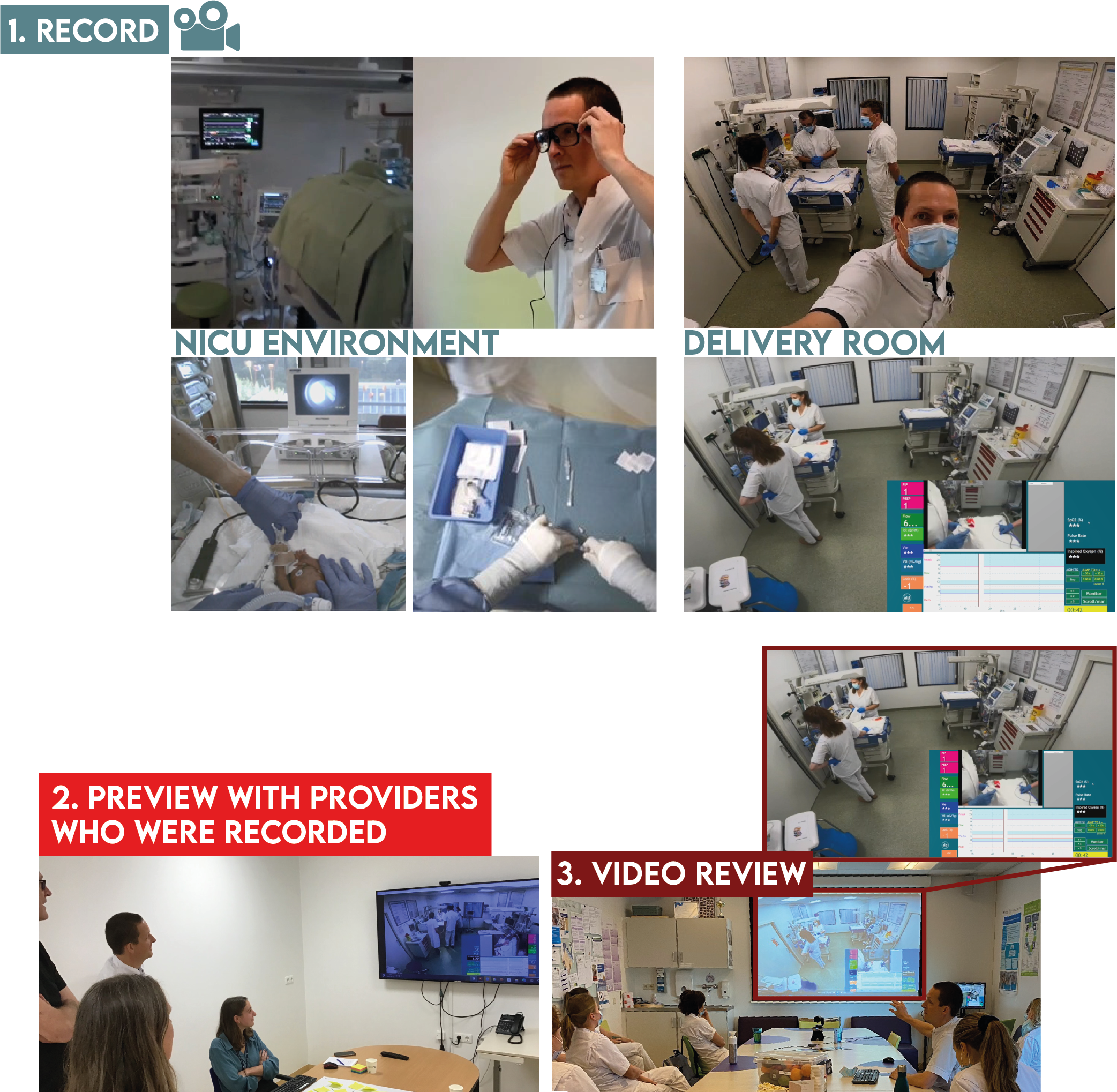
Modern technology has significantly simplified the recording process in medical settings. Options include smartphones, specialized glasses, or fixed cameras, each with its own advantages depending on the specific procedure and environment.

With proper setup and staff engagement, recording can become a routine part of procedures. Provide thorough training on equipment use and recording protocols to ensure consistency and quality. Emphasize the potential benefits, such as enhanced training for new professionals and improved team collaboration, to encourage staff buy-in.

Establish clear guidelines for when and how to record, including any pre-procedure checklists or post-procedure tagging systems to organize the collected video data effectively.

### [<mark style="color:blue;">**Reflect**</mark>](/level-2-in-action/reflect)

Video review facilitates knowledge sharing among colleagues in a way that verbal descriptions or written notes cannot match. By examining recorded procedures together, teams can identify best practices and areas for improvement with a level of detail and objectivity that was previously difficult to achieve.

Set up regular review sessions where team members can discuss recorded procedures in a constructive, non-judgmental environment. Encourage open dialogue and the sharing of insights from different perspectives. This collaborative approach often leads to refined techniques and enhanced patient care as team members learn from each other's experiences and observations.

Consider developing a structured format for these review sessions to ensure they remain focused and productive. This might include specific criteria for evaluation or a system for categorizing observations and recommendations.

### [<mark style="color:blue;">**Refine**</mark>](/level-2-in-action/refine)

Team-wide video analysis allows for the combination of diverse perspectives and expertise. Providers can pinpoint specific areas for improvement in their practices, from technical skills to communication and teamwork dynamics.

Use the insights gained from video review to develop targeted improvement plans. This might involve modifying protocols, adjusting equipment setups, or focusing on particular aspects of a procedure during training sessions.

Track changes and improvements over time by comparing videos of similar procedures. This data-driven approach to refinement directly contributes to higher quality care and can be a powerful tool for demonstrating the value of the video review program to leadership and stakeholders.

## Neoflix: record, reflect, refine

The Neoflix 'Record, Reflect, Refine' framework provides a structured approach to video review in healthcare settings. By following these steps and adapting them to your specific environment, you can create a sustainable and effective video review program that enhances both individual and team performance.

Remember that implementing such a program is an iterative process. Regularly solicit feedback from participants and be prepared to adjust your approach as you learn what works best for your organization. With patience and persistence, video review can become a valuable tool for continuous improvement in healthcare delivery.

<table data-view="cards"><thead><tr><th></th><th></th><th></th><th data-hidden data-card-target data-type="content-ref"></th></tr></thead><tbody><tr><td></td><td>LEVEL 1: Fundamentals</td><td></td><td><a href="https://github.com/LennartvdM/NFLX-nieuwe-structuur/blob/main/welcome/neoflix/broken-reference/README.md">https://github.com/LennartvdM/NFLX-nieuwe-structuur/blob/main/welcome/neoflix/broken-reference/README.md</a></td></tr><tr><td></td><td>LEVEL 2: In action</td><td></td><td><a href="https://github.com/LennartvdM/NFLX-nieuwe-structuur/blob/main/welcome/neoflix/broken-reference/README.md">https://github.com/LennartvdM/NFLX-nieuwe-structuur/blob/main/welcome/neoflix/broken-reference/README.md</a></td></tr><tr><td></td><td>LEVEL 3: Growth</td><td></td><td><a href="https://github.com/LennartvdM/NFLX-nieuwe-structuur/blob/main/welcome/neoflix/broken-reference/README.md">https://github.com/LennartvdM/NFLX-nieuwe-structuur/blob/main/welcome/neoflix/broken-reference/README.md</a></td></tr></tbody></table>


# LEVEL 1: FUNDAMENTALS

This section introduces the core concepts of video review and its implementation in organizational settings. We explore the applications of video review and key considerations for planning an effective program. The discussion also covers strategies for gaining team support and engagement.

A critical component of this module is the [*Safe, Simple & Small*](https://github.com/LennartvdM/NFLX-nieuwe-structuur/blob/main/level-1-fundamentals/3.-safe-simple-and-small) approach to video review. This framework emphasizes the importance of prioritizing safety, maintaining simplicity, and managing the scale of video review initiatives. By adhering to these principles, organizations can establish a solid foundation for their video review processes.

The *Safe, Simple & Small* methodology ensures that video review practices are implemented in a manner that protects participants, streamlines workflows, and allows for gradual scaling as needed. This approach helps mitigate potential risks associated with video review while maximizing its benefits.

Throughout this section, we will delve into specific techniques and best practices for each aspect of the *Safe, Simple & Small* framework. This guidance will equip you with the knowledge needed to design and implement an effective video review program tailored to your organization's needs.


# 1. Preproduction

Neoflix supports medical teams with implementation guidance, helping introduce video review strategies and integrate them into existing workflows. The platform facilitates sharing experiences and best practices while maintaining privacy and respect. Additionally, Neoflix provides tools for connecting to a global learning community, fostering collaboration among medical professionals.

#### Steps for Success <a href="#steps-for-success" id="steps-for-success"></a>

To implement video review effectively, medical teams can take several key steps:

1. Seek mentorship from institutions with established video review programs. Their experience can provide valuable guidance and support, streamlining the implementation process. You can find centers who have experience with video review in [Learning from success stories](https://github.com/LennartvdM/NFLX-nieuwe-structuur/blob/main/level-1-fundamentals/4.-learning-from-success-stories).
2. Share learnings with the wider medical community as your own program develops. This exchange of insights drives innovation and improves the field as a whole. You can share your experiences [here](/level-1-fundamentals/4.-learning-from-success-stories/4.1-share-your-experience).
3. Build a network of peers invested in video review. This allows for collaborative problem-solving, addressing common challenges in implementation and optimization. Take a look at our [Neoflix Community](/level-3-growth/18.-expanding-your-video-program/18.1-revolutionize-reflection-in-medical-care-join-the-network).

By engaging with these resources and actively participating in the learning process, medical teams can maximize the benefits of video review. This approach not only enhances individual practice but also contributes to the overall advancement of medical care through shared knowledge and experience.


# 1.1 Beyond the procedure

Focusing your video review project

## **Self-Assessment**

Routine can be the enemy of excellence, or at least, if you let it. We all fall into habits, losing the ability to see our own work objectively over time. Video becomes a powerful diagnostic tool on your own practice.

This type of honest self-assessment is a hallmark of continuous improvement. By pinpointing areas for targeted refinement, you unlock your potential and deliver even better care. No matter your specialty, video offers an objective lens, letting you analyze everything from technical skills to the nuances of patient interactions:

* **Optimizing Technique:** Whether you're suturing, resuscitating, manipulating joints, or administering injections, identify inefficient micro-movements and optimize technique.
* **Enhancing Communication:** Analyze your nonverbal cues, explanations tailored to individual patients, and how well you address questions or concerns.
* **Holistic Assessment:** Capture your use of space, your body language, and how these may impact a patient's experience of care.
* **Efficiency and Workflow:** Analyze routine tasks within your specific role. Are there potential changes in equipment setup, communication with support staff, or documentation that could save you valuable time?
* **Research & Training Aid:** Even without anonymizing footage, your own recordings can become a valuable tool for developing in-house training materials or refining protocols.

## **Bridging Gaps**

Modern healthcare is a complex ecosystem where specialists, support staff, and researchers work together to deliver the best possible patient outcomes. However, fully understanding the patient experience from every angle can be a challenge. This is where video becomes an invaluable tool:

* **Shattering Silos:** Video offers a unique window into the work of other teams. See how decisions in one department impact downstream care, fostering empathy and a more holistic view of the patient journey.
* **Collaborative Learning:** Analyze procedures as a multidisciplinary team, identifying opportunities to optimize workflows, streamline handoffs, and minimize delays.
* **Breaking Down Knowledge Barriers:** Written reports can only go so far. Video lets less experienced staff "see" how senior colleagues approach complex cases, promoting skill sharing and faster learning curves.
* **Fostering a Unified Vision:** By revealing how individual actions contribute to the bigger picture, video strengthens the sense of shared purpose and teamwork, crucial for optimal patient care.

## **Taking a different approach**

Studies on video review often focus on quality improvement by measuring a decrease in errors or deviations from guidelines. However, this approach has limitations; it emphasizes safety by minimizing negative outcomes (the Safety-I approach), assuming mistakes stem from individual technical, human, or organizational failures. In the increasingly complex world of healthcare, a newer safety model has emerged: Safety-II. This approach focuses on the ability to succeed under varying conditions, acknowledging that real-world practice often differs from idealized guidelines. Instead of solely analyzing mistakes, Safety-II studies how things usually go right, providing insights into occasional failures. It values learning from variability and performance adjustments as a source of new knowledge.

<figure><img src="https://www.researchgate.net/publication/282442036/figure/fig4/AS:614217019297804@1523452157884/Focus-of-Safety-I-and-Safety-II.png" alt=""><figcaption><p>Safety-II Hollnagel et al. (2013</p></figcaption></figure>

By visualizing these essential components of care, video review becomes an invaluable quality improvement tool. Reviewing workflow clarifies team member responsibilities and reinforces effective communication. This aligns with the Safety-II approach, which focuses on enhancing a system's ability to succeed under varying conditions and optimizing everyday outcomes. When reviewing videos with all providers involved in hands-on care, opportunities for improvements in daily performance become visible.

<table data-card-size="large" data-view="cards"><thead><tr><th></th><th></th><th></th></tr></thead><tbody><tr><td></td><td><p><mark style="color:green;">By adopting a Safety-II approach, you will learn about your team's resilience and adaptability. However, you also don't ignore failures. Safety-II acknowledges that errors and incidents happen, but it focuses on learning from them without assigning blame.</mark></p><p><mark style="color:green;">This may result in a positive environment, coming from a shift in perspective. Instead of constantly looking for what might go wrong (Safety-I approach), Safety-II helps you build on the existing strengths and capabilities within the system.</mark></p></td><td></td></tr><tr><td></td><td><mark style="color:red;">In contrast, the Safety-I approach often centers around finding causes of failure and preventing them in the future. This can unintentionally put a spotlight on individuals' mistakes. If the organizational culture isn't strong in terms of psychological safety, a Safety-I approach can reinforce a fear of blame. Providers might worry their recorded mistakes will lead to punishment or negative consequences. While mistakes always provide learning opportunities, Safety-I inherently focuses more on what went wrong than what goes right. This can create additional anxiety for providers, knowing that their videos will be analyzed primarily for errors.</mark></td><td></td></tr></tbody></table>


# 1.2 Use cases

Exploring how video review can be used in various ways

Video review has diverse applications. Consider these examples, and you might realize you're already closer to using video review than you think...

* **Interdisciplinary understanding:** Strong communication between specialists is crucial, yet each role has its own focus. Share recordings with those in different roles, fostering a deeper understanding of how seemingly small actions impact overall care. This can lead to more empathetic and efficient collaboration.

*A scheduled knee replacement went smoothly with no complications. The OR team took the initiative to review the recorded procedure afterward. They were surprised to notice a few instances of near-misses with instrument hand-offs and moments of slight workflow confusion. While no actual errors had occurred, the team used these observations to refine their communication protocols. They implemented a simple checklist to confirm roles and responsibilities at key points during surgery, leading to increased efficiency and a stronger sense of teamwork in the OR.*

* **Parents' perspective:** Reviewing recordings of neonatal stabilization with parents offers valuable insights into their experiences. Their direct feedback reveals emotions and needs during that critical time. Key parental insights shared during review sessions, enrich discussions and foster a deeper understanding of how to best support families.

*The parents of a newborn premature infant watched the video of their newborn's stabilization. It was a whirlwind of medical jargon and frantic movements. But as they voiced their fear and confusion, the medical staff found ways to include parents in the care process, making the NICU less intimidating and fostering a deeper understanding of the family's experience.*

* **Targeted skill development:** Trainees can record themselves performing specific tasks. This facilitates individualized coaching, even when in-person guidance is limited.

*Trainee intensivists record themselves performing elective intubations. Later on, together with other trainees, they review the recordings with a specialist, receiving feedback from their peers as well.*

* **Real-time guidance & review:** Experienced neonatologists provide real-time guidance on emergency resuscitation cases via teleconferencing software incorporating a live view of the procedure.

*A premature infant struggles for life in a remote Australian outback hospital. With no neonatologist on-site, the team initiates a teleconference with specialists thousands of miles away. The specialists, use the video feed to guide the local staff. They instruct them on delicate life-saving procedures. Afterwards, they review the recording together with the local staff and evaluate the procedure and the guidance given through teleconferencing.*

* **Global knowledge sharing:** Experienced specialists can provide detailed feedback on recordings from colleagues practicing in under-resourced regions. This benefits patients worldwide.

*A remote, low-resource setting hospital, records a medical emergency. Specialists thousands of miles away, from a higher-resource setting, review the video together with the team, identifying a new way of how to respond in the specific medical emergency. Later, the clinic shares their successful outcome. Both the remote team and the specialists gain valuable knowledge, demonstrating the power of collaborative learning across resource-rich and resource-limited settings.*

***

These examples offer a starting point, but the potential uses of video reflection in medicine are far wider. We're always seeking to expand our understanding of how this technology can improve care. If you have examples that defy easy categorization, or ideas for how video can address unique challenges in your field, please don't hesitate to share them with us!


# 1.3 History of videorecording in healthcare

While the use of video review in healthcare feels like a recent phenomenon, its roots stretch back several decades. Here's a look at its evolution:

## Early pioneers: <a href="#early-pioneers" id="early-pioneers"></a>

* 1960s/70s: Pioneering center used closed-circuit television to record procedures for immediate self-review and teaching purposes within emergency medical care.
* Focus on Technical Skills: Initial use primarily centered on assessing individual surgical technique and providing targeted feedback.
* Equipment Challenges: Bulky equipment and limited storage options posed early barriers to widespread adoption.

{% embed url="<https://www.surgjournal.com/article/0039-6060(69)90247-5/abstract>" %}

## Technology opens doors: <a href="#technology-opens-doors" id="technology-opens-doors"></a>

* 1980s/90s: Advances in video recording, storage, and software made the system more portable and user-friendly.
* Expanding Focus: Applications broadened to include communication and teamwork analysis, moving beyond sole technical assessment.

## Digital and Networked Era: <a href="#digital-and-networked-era" id="digital-and-networked-era"></a>

* 2000s: The shift to digital recording and networked systems greatly enhanced storage capacity and ease of access for review.
* Widespread Interest: Video review began gaining popularity across various medical specialties beyond surgery.
* Specialization: Dedicated video capture systems designed for specific healthcare settings appeared.

{% embed url="<https://publications.aap.org/pediatrics/article-abstract/106/4/654/65773/Video-Recording-as-a-Means-of-Evaluating-Neonatal>" %}

## Recent innovations: <a href="#recent-innovations" id="recent-innovations"></a>

* 2010s - Present: Advancements in mobile cameras and wearable devices expand the possibilities of video review:
  * Democratization of Recording: Providers easily capture procedures with readily available technology.
    * Focus on Workflow Integration: Emphasis on seamless recording and review processes within an existing clinical systems.
    * Patient-Centric Uses: Exploration of uses like recording consent conversations and enhancing patient education.

{% embed url="<https://www.cambridge.org/core/journals/canadian-journal-of-emergency-medicine/article/analysis-of-eyetracking-behaviours-in-a-pediatric-trauma-simulation/004E673BC9C6AE7B4093EEA04D19C90C>" %}

## The future is collaborative: <a href="#the-future-is-collaborative" id="the-future-is-collaborative"></a>

Video review in healthcare has journeyed from a tool for individual skill analysis to a multifaceted approach driving continuous quality improvement. Emerging trends point towards increased sharing of knowledge across institutions, a greater focus on patient-provider interactions, and the integration of video data with other healthcare analytics for even deeper insights.


# 1.4 Unburdening the process

## How video reflection eases the strain

We understand that adding anything to the already overloaded schedules of healthcare professionals can seem counterintuitive. The key to video reflection is that, while it requires an initial investment, it ultimately unburdens processes, creates efficiencies, and offers much-needed breathing room in the long run.

**How it works:**

* **Exposing hidden time-sinks:** Video recordings reveals the often-invisible inefficiencies within procedures and team interactions. By identifying these areas, you streamline processes and reclaim precious time.
* **Learning from the past, saving time in the future:** Video review enables in-depth analysis, helping you recognize patterns. This translates to a better understanding of what works well, what needs improvement, and the ability to anticipate future challenges.

## The payoff: more time for what matters

The initial implementation of video reflection takes effort. But the rewards far outweigh the investment:

* **Workflow optimization:** Efficient processes and collaboration directly translate to more time for patient care.
* **Team empowerment:** Video reflection fosters collaborative growth and reduces reliance solely on top-down instruction.

## A tool for a smoother workflow

Yes, implementing video reflection takes an initial investment of time and effort. However, the payoff is a streamlined workflow, improved efficiency, and ultimately, more time to focus on what truly matters - delivering exceptional patient care. Think of video reflection as a tool that allows you to work smarter, not harder.

{% tabs %}
{% tab title="Changes in guideline" %}
**Changes in guideline**

After weekly video review sessions were implemented, providers complied more often to the guideline (63 vs. 77%; p < 0.001).

{% embed url="<https://www.frontiersin.org/articles/10.3389/fped.2019.00294/full>" %}
Root et al. (2019)
{% endembed %}

***

Based on the results of the following study it was recommended to change the guideline for neonatal intubation during resuscitation.

{% embed url="<https://www.sciencedirect.com/science/article/pii/S0022347604001799?via%3Dihub>" %}
{% endtab %}

{% tab title="Quality improvement " %}
**Quality improvement**

Video review and feedback process was significantly associated with improvements in quality metrics for resuscitation in cardiac arrest amongst patients presented to the emergency department.

{% embed url="<https://onlinelibrary.wiley.com/doi/full/10.1111/ijcp.14525>" %}
Brooks et al (2021)
{% endembed %}
{% endtab %}

{% tab title="Teamwork" %}
**Teamwork**

Teamwork improved after debriefing with video recordings.

{% embed url="<https://qualitysafety.bmj.com/content/20/2/163.short>" %}
Nadler et al (2011)
{% endembed %}
{% endtab %}

{% tab title="Identifying areas for improvement" %}
**Identifying areas for improvement**

This study showed how video review empowered providers to identify and address various areas for improvement in neonatal care.

{% embed url="<https://doi.org/10.1038/s41390-024-03083-w>" %}
Heesters et al (2023)
{% endembed %}
{% endtab %}
{% endtabs %}


# 2. Planning your initiative

To successfully integrate video review into your practice, consider the following key areas:

## Gaining team buy-in <a href="#gaining-team-buy-in" id="gaining-team-buy-in"></a>

Define clear objectives for the video review process. These may include improving specific procedures, enhancing teamwork, or identifying best practices. Communicate these goals effectively to all staff members, emphasizing how video review can contribute to professional development and improved patient care. Address any concerns or reservations team members might have about being recorded.

## Technology <a href="#technology" id="technology"></a>

Select recording devices that are easy to use and suited to your practice's specific needs. Consider factors such as video quality, audio clarity, and ease of integration with existing systems. Evaluate different options for storing and accessing recorded content, ensuring that the chosen solution is secure and compliant with healthcare data regulations. Factor in the learning curve associated with new technology and plan for adequate training.

## Budget <a href="#budget" id="budget"></a>

Account for both immediate and long-term costs associated with implementing video review. Initial expenses may include purchasing recording equipment, storage solutions, and playback software. Ongoing costs to consider are potential upgrades, maintenance, and the time investment required for review sessions. Evaluate the return on investment in terms of improved patient outcomes and efficiency gains.

## Workflow Integration <a href="#workflow-integration" id="workflow-integration"></a>

Plan how video review will fit into existing processes without creating excessive workload burdens. Identify suitable times for recording that don't disrupt patient care. Schedule review sessions at times that accommodate both medical and nursing staff, ensuring broad participation. Develop a system for selecting which procedures or interactions to record and review. Consider how findings from video reviews will be incorporated into practice improvements.


# 2.1 Pioneer team

First things first

## Creatin**g your neoflix d**ream team

The key to video review success lies with your pioneers – those trusted and respected individuals who will champion this powerful process. These pioneers should:

* **Lead by example:** Record their procedures as the first providers, showing a willingness to grow and learn.
* **Be change agents:** Actively help set up *Neoflix* and support others embracing change.
* **Represent the team:** Include pioneers from various disciplines (doctors, nurses, etc.) for a holistic approach.

Think of these questions as you identify your pioneers:

* [ ] Do colleagues deeply trust them?
* [ ] Are their skills and judgment widely respected?
* [ ] Does the group reflect the diversity of your unit?

<table data-card-size="large" data-view="cards"><thead><tr><th></th><th></th><th></th></tr></thead><tbody><tr><td><mark style="color:green;">Trust is vital for creating an environment where people feel comfortable participating in video review. By carefully selecting a pioneer team that embodies empathy, understanding, and a learning mindset, you're fostering this essential trust. A diverse pioneer team, representing various disciplines within your unit, builds inclusivity and ensures everyone feels represented. People are more likely to approach someone who understands their specific work context and challenges. This approachable team encourages open communication, guaranteeing that if anyone faces difficulties during the video review process, they feel comfortable seeking guidance.</mark></td><td></td><td></td></tr><tr><td></td><td><mark style="color:red;">If certain disciplines feel underrepresented or unheard, they may be less likely to trust the process. This can lead to reluctance in sharing videos or engaging in constructive feedback. In addition, without input from a diverse pioneer team, the analysis of videos might miss crucial insights specific to different disciplines. This could result in incomplete solutions or recommendations that don't address system-wide improvements. Finally, individuals from underrepresented disciplines might feel excluded and less valued. This can discourage participation and make them less likely to raise concerns or offer suggestions for improvement.</mark></td><td></td></tr></tbody></table>

### **The Neoflix team of the LUMC NICU**

Get inspired! Meet the real-life pioneers behind Neoflix at the LUMC NICU:

<table data-view="cards"><thead><tr><th></th><th></th><th></th></tr></thead><tbody><tr><td>Veerle Heesters</td><td></td><td></td></tr><tr><td>Ruben Witlox</td><td></td><td></td></tr><tr><td>Henriette van Zanten</td><td></td><td></td></tr><tr><td>Arjan te Pas</td><td></td><td></td></tr><tr><td>Veerle Heijstek</td><td></td><td></td></tr></tbody></table>

## **Empowerment is key**

Your Neoflix team thrives on a clear structure and provider empowerment:

* **Define roles:** Who manages videos, chairs reviews, etc? Keep it multidisciplinary!
* **Provider control:** If recording is voluntary, consent is needed at multiple stages.
* **Listen & respond:** Address concerns openly and honestly.

**Your success starts with your pioneers!** With their dedication and enthusiasm, you'll create a culture of continuous improvement and the best possible care for your patients.


# 2.2 Gaining team buy-in

## **Introducing \_Neoflix**\_**: your NICU's learning and improvement hub** <a href="#introducing-neoflix-your-nicus-learning-and-improvement-hub" id="introducing-neoflix-your-nicus-learning-and-improvement-hub"></a>

Imagine a space where the NICU team comes together to share experiences, learn from one another, and continuously improve care for your tiniest patients. That's the power of *Neoflix*, a video review initiative built on collaboration and openness.

> *“In my opinion, a team improves in a way that is not measurable. Through video review, openness within a team is created. Here you can give feedback to each other, which leads to better teamwork.” -* Consultant neonatologist

## **Building trust: the key to successful video review in healthcare** <a href="#building-trust-the-key-to-successful-video-review-in-healthcare" id="building-trust-the-key-to-successful-video-review-in-healthcare"></a>

Video review offers incredible potential to improve patient care, but it must be done in a way that fosters trust and respects the healthcare team. Here's how to create a positive, empowering environment:

### **1. Consent & transparency: the foundation of trust** <a href="#id-1.-consent-and-transparency-the-foundation-of-trust" id="id-1.-consent-and-transparency-the-foundation-of-trust"></a>

* **Clear communication:** Explain how videos will be used, who has access, and make sure patients and staff fully understand. Transparency eliminates uncertainty.
* **Open dialogue:** Discuss video plans with your team and invite their feedback. Their input shapes a process they feel invested in.

### **2. Collaboration for growth, not judgement** <a href="#id-2.-collaboration-for-growth-not-judgement" id="id-2.-collaboration-for-growth-not-judgement"></a>

* **Shared learning:** Emphasize video as a tool for collective improvement, not finding fault.
* **Respectful choice:** Opt-in systems allow staff to participate at their comfort level, building confidence.
* **Video is powerful, but not a cure-all:** True progress comes from a blend of tools, including mentorship and open communication.

### **3. Introducing video review: purpose, process, benefits** <a href="#id-3.-introducing-video-review-purpose-process-benefits" id="id-3.-introducing-video-review-purpose-process-benefits"></a>

* **Explain the why:** Share the vision – skill development and better care within a safe learning environment.
* **Clear process:** Outline the steps, who has access to videos, and how to voice any concerns.
* **The benefits:** Video offers objectivity, a broader view of care, and drives improvements in teamwork, quality, and processes.

<table data-card-size="large" data-view="cards"><thead><tr><th></th><th></th><th></th></tr></thead><tbody><tr><td></td><td><p><mark style="color:green;">Invest time in explaining video review with complete transparency, emphasizing its collaborative, learning-focused purpose. Engage your team with honest dialogue, seeking their input, and clearly establish the voluntary nature of participation. Reaffirm that the goal is improvement, not judgment.</mark></p><p><mark style="color:green;">These actions will foster a sense of trust, leading to greater willingness to participate in video review. Providers will feel heard and valued, resulting in open communication and a shared commitment to improvement. With reduced anxiety, the review process will generate better insights and more actionable solutions for enhanced patient safety.</mark></p></td><td></td></tr><tr><td></td><td><mark style="color:red;">If you don't prioritize transparency, collaboration, and respect for voluntary participation, you risk creating an environment of distrust and apprehension around video review. Providers might feel that the process lacks clarity or is designed to find fault, leading to resistance and limited participation. Without establishing a non-judgmental atmosphere, anxieties may run high, stifling open communication and the potential for valuable learning. The result could be superficial analysis, ineffective solutions, and a missed opportunity to genuinely improve patient safety.</mark></td><td></td></tr></tbody></table>

####

**By putting trust at the center, video review becomes a powerful tool for continuous learning and delivering the best possible care to your patients.**\\

***

{% file src="/files/fbOsvXvP8DNp12IppZZF" %}


# 2.3 Resources

## **Resources & teamwork**

* **Helpful Tools:** Provide [supporting articles](/level-1-fundamentals/1.-preproduction/1.4-unburdening-the-process), presentations, and [FAQs](/welcome/quick-start/faqs).
* **Defined Roles:** Establish who manages videos, chairs reviews, etc., including a [mix of disciplines](/level-1-fundamentals/2.-planning-your-initiative/2.1-pioneer-team) for a well-rounded team.
* **Provider Control:** Voluntary participation and [consent at multiple stages](https://github.com/LennartvdM/NFLX-nieuwe-structuur/blob/main/level-1-fundamentals/3.-safe-simple-and-small#safe-obtaining-consent) keeps providers in control of their participation.
* **Addressing Concerns:** Listen actively and provide honest, transparent responses.
* **Collaborative Spirit:** Involve all relevant staff when scheduling reviews. Management support reinforces the initiative's importance.

## Tips & tricks

<table data-view="cards"><thead><tr><th></th><th></th><th></th></tr></thead><tbody><tr><td><p><strong>Streamline Recording:</strong></p><p><a href="https://github.com/LennartvdM/NFLX-nieuwe-structuur/blob/main/level-2-in-action/8.-recording-during-the-intervention">Minimize the number of steps involved</a> in initiating video recording procedures.</p></td><td></td><td></td></tr><tr><td><p><strong>Gentle Reminders for Recording:</strong></p><p>Encourage providers to record care during handovers or other points, but avoid pressuring them.</p></td><td></td><td></td></tr><tr><td><p><strong>Voluntarily</strong></p><p>Make recording and reviewing <a href="https://github.com/LennartvdM/NFLX-nieuwe-structuur/blob/main/level-2-in-action/5.-preparation-and-consent">voluntary</a>, providers choose themselves if they want to record their interventions.</p></td><td></td><td></td></tr><tr><td><p><strong>Enrich recordings:</strong></p><p>Consider including <a href="/level-2-in-action/6.-recording-equipment/6.4-patient-monitoring-systems">respiratory data or videolaryngoscopy </a>alongside intubation footage for a more comprehensive review.</p></td><td></td><td></td></tr><tr><td><p><strong>Audio for non-technical skills:</strong></p><p>Leverage <a href="/level-1-fundamentals/3.-safe-simple-and-small/3.3-small">audio</a> to evaluate communication, teamwork, and collaboration during procedures.</p></td><td></td><td></td></tr><tr><td><p><strong>Patient/Parent review (neonatal):</strong></p><p>Explore the possibility of showing recordings to patients or parents in neonatology for feedback and care improvement.</p></td><td></td><td></td></tr></tbody></table>

## **Developing your own protocol**

The following protocol is an example that can be used to get management permission for implementing a video review pilot program:

<details>

<summary>Sample of a video review protocol for improving care</summary>

INTRODUCTION\
Video review offers a valuable tool for reflection and improvement in emergency or intensive care settings. This protocol outlines its implementation.\
\
GOAL\
Enhance quality of care through video review as an educational tool. Improve both technical and non-technical skills during emergency interventions.\\

PREBRIEFING

* **Pre-briefing:**
  * Management informs staff (nursing & medical) about the pilot program, emphasizing a safe learning environment.
  * Gain staff buy-in through newsletters, handovers, and meetings.
* **Considerations:**
  * Importance of obtaining consent at all stages.
  * Maintaining patient privacy

PROCEDURE

1. **Before Intervention:**
   * Obtain consent from the entire team performing the intervention. (No recording if someone refuses)
   * Identify a recorder and camera position.
   * (Optional) Seek verbal consent from patient/family (when only used for quality assurance, not mandatory)
2. **Post-intervention:**
   * Standard post-briefing.
   * Re-obtain consent for video review (unused if refused)
   * Recordings stored on a secure server, accessible only to authorized personnel.
3. **Previewing by Caregivers:**
   * Obtain consent for using the video in the review session (unused if refused)

REVIEW

**Video Review Session:**

* **Focus:** Learning from successes and variations in care.
* **Duration:** Maximum 30 minutes
* **Timing:** 2-3 weeks after the procedure, during nurse handover (inviting medical staff)

POST-REVIEW

* Recordings deleted after use.
* Lessons learned inform future quality improvement initiatives.

**Medico-Legal Issues:**

* Incidents may be captured.
* Legal proceedings may require retaining evidence.
* Patient consent not mandatory for quality improvement (GDPR guidelines followed).
* All team members consented before/after recording and review. (Patient consent sought when possible).
* Legal counsel reviewed the protocol.
* Video data deleted after study completion.
* Standard practice includes video monitoring of patients in rooms.
* Recordings deemed an extension of standard care with patient consent (educational/research purposes).

**Informed Consent:**

* Not mandatory for quality improvement.
* Encouraged to obtain verbal consent from patients/families.
* Refusal to consent prevents recording.
* Triple consent process for caregivers ensures control throughout.

**Other considerations:**

* Hawthorne effect: potential for heightened performance (often positive) due to being observed.

</details>

{% embed url="<https://bmjopenquality.bmj.com/content/13/2/e002588.abstract>" %}

Action research on the department of Neonatology of the LUMC has resulted in the development of the following guideline:

<figure><img src="https://1970177761-files.gitbook.io/~/files/v0/b/gitbook-x-prod.appspot.com/o/spaces%2Fn5nZuEQtMW7vjS2x309q%2Fuploads%2Fgit-blob-222314a7969ae40d3dea946373572478a411150c%2F(re)defined%20guideline%20for%20video%20review%20version%20GOEDE%20FIGUUR.png?alt=media" alt=""><figcaption></figcaption></figure>


# 3. Safe, Simple & Small

## Starting your video review project: safe, simple, small

Begin your video review journey with a focus on safety, simplicity, and manageable scale. Here's how:

* **Prioritize a** [**safe environment**](/level-1-fundamentals/3.-safe-simple-and-small/3.1-safe)**:** Emphasize the voluntary nature of participation and establish a culture of support within your team by having a clearly defined consent procedure.
* **Keep it** [**simple**](/level-1-fundamentals/3.-safe-simple-and-small/3.2-simple)**:** Start with straightforward procedures and a user-friendly recording setup. Start with readily available technology (smartphones, tablets, basic cameras) for initial setup.
* **Start** [**small** ](/level-1-fundamentals/3.-safe-simple-and-small/3.3-small)**& build momentum:** Avoid overcomplicating the process early on, as enthusiasm and confidence grow, you can strategically expand the scope of your project, for example by adding audio. Build trust among providers and patients by starting with less sensitive procedures and clear communication about audio usage. Develop robust protocols for audio recording, storage, management, and deletion.

**See how your peers are doing it? –** [**click here**](https://github.com/LennartvdM/NFLX-nieuwe-structuur/blob/main/level-1-fundamentals/4.-learning-from-success-stories) **for inspiring success stories.**


# 3.1 Safe

Practical guidance

## Securing consent: a crucial step for video review in healthcare

**Consent is the foundation of ethical video review in healthcare.** However, procedures for obtaining consent can vary significantly between hospitals, both within and across countries.

### **Understanding your institution's rules:**

Before implementing video review, familiarizing yourself with your hospital's policies is crucial. These policies typically address obtaining and documenting informed consent from patients and staff regarding:

* Recording procedures
* Data storage and access
* Video usage for educational, research or quality improvement purposes

Understanding these policies ensures your video review initiative adheres to best practices and aligns with your institution's legal and ethical frameworks.

### **Where to find them:**

* Hospital intranet or policy manuals
* Human Resources department
* Risk Management or Legal department
* Department heads or supervisors

### Consider the following questions:

#### **Patient consent**

* **Informed consent:** Detailed procedures for obtaining and documenting patient consent for recording, storage, and use of their medical data, including video.
* **Privacy and confidentiality:** Strict guidelines aligned with HIPAA (or relevant regulations in your region) on protecting patient information, restricting access to video footage, and secure storage measures.
* **Patient rights:** Policies outlining patient rights in relation to video review, such as the right to refuse recording, access their recordings, or request changes.

When and how are patients informed?

* [ ] Should patients explicitly consent?
* [ ] Can patients request to delete recordings?
* [ ] Who can be contacted in case of questions?
* [ ] Will recordings be shared with patients?

{% hint style="info" %}
Research on the neonatal intensive care unit (NICU), showed that sharing recordings of neonatal stabilization with parents, can be beneficial for parents and their coping. Parents of infants admitted to the NICU of the Leiden University Medical Center (LUMC), reviewed recordings and reported that they appreciated it and doing so, made them less likely to hold providers responsible for medical malpractice (den Boer et al. 2021).
{% endhint %}

#### **Provider consent**

* **Consent for recording:** Procedures for obtaining staff consent before, during, and after recording procedures. This might include opt-in systems and the right to withdraw consent at any time.
* **Video usage:** Clear definition of allowable purposes for video recording and review (quality improvement, education, etc.). Explicit prohibition of using footage for punitive measures.
* **Professional conduct:** Expectations for staff behavior during recordings to ensure respectful and appropriate interactions.

- [ ] When and how are providers informed?
- [ ] Should providers explicitly consent?
- [ ] Can individual providers refuse recording or reviewing?

The *Neoflix* approach recommends you to use a [triple consent](/level-2-in-action/5.-preparation-and-consent/5.1-obtain-consent) procedure.

#### **Additional considerations**

* **Medico-legal:** Procedures for handling video recordings in the event of adverse incidents or legal claims, including potential obligations to retain footage.
* **Research:** Specific policies if video recordings are to be used for research purposes. These might include additional approval processes and ethical considerations.

**Consent procedures may differ between hospitals, both nationally and internationally.** [**Click here**](https://github.com/LennartvdM/NFLX-nieuwe-structuur/blob/main/level-1-fundamentals/4.-learning-from-success-stories) **for different consent approaches from NICU's who have implemented video review successfully.**

<table data-card-size="large" data-view="cards"><thead><tr><th></th><th></th><th></th></tr></thead><tbody><tr><td></td><td><mark style="color:green;">Implementing a triple consent procedure in your video review program establishes multiple layers of respect and autonomy for providers. This builds trust and empowers them, increasing their willingness to participate. The ability to withdraw consent at any time reduces anxiety and fosters a positive learning environment. The focus on consent also encourages open communication, leading to greater collaboration and better overall outcomes.</mark></td><td></td></tr><tr><td></td><td><mark style="color:red;">Not asking for consent in your video review program undermines trust and erodes provider autonomy. This can lead to resistance, resentment, and a decreased willingness to participate, limiting the potential for learning and improvement. Providers may feel anxious or concerned that their work could be used without their knowledge or approval, hindering a positive learning environment. The lack of open communication about the process could lead to misunderstandings, further damaging trust and potentially compromising the entire program's success.</mark></td><td></td></tr></tbody></table>


# 3.2 Simple

## **Technical & operational policies**

* **Data storage and security:** Approved methods for storing video data, encryption requirements, strict access controls, and data retention periods.
* **Equipment standards:** Specifications for recording equipment, camera placement guidelines to ensure both patient privacy and capture of relevant details.
* **Video rview protocol:** Structured process for video review sessions, emphasizing a safe learning environment, non-judgmental approach, and the role of a facilitator.

## **Consider the following questions:**

### **Storage:**

* **De-identification:** Are patient and provider identifiers removed to protect privacy?
* **Location:** Where will recordings be stored (local server, cloud-based, etc.)?

### **Protection:**

* **Encryption:** Are recordings deidentified when they are stored?
* **Access Control:** Are access control measures implemented?(role-based permissions, audit logs)

### **Legal Context:**

* **Quality Assurance Protection:** Are recordings offered protection as they are marked for quality assurance purposes?
* **Case Law:** Stay informed about emerging legal precedents related to the use of medical video recordings in court cases.

{% hint style="info" %}
So far, no legal cases have been reported by any NICU. The [NICU of the LUMC ](/welcome/neoflix/streamlining-neonatal-care-a-success-story)has implemented recording and reviewing of neonatal stabilization since 2014 and has not encountered any medicolegal issues. It is not yet clear if recordings can be used in court. (Den boer et al 2018)
{% endhint %}

## **Recording** [**Equipment Selection:**](https://github.com/LennartvdM/NFLX-nieuwe-structuur/blob/main/level-2-in-action/6.-recording-equipment)

* **Simplicity First:** Do you already have readily available technology (smartphones, tablets, basic cameras) for initial setup?
* **Later Upgrades:** As your program matures, consider incorporating:
  * **Respiratory Monitors:** If applicable, add devices to capture respiratory data alongside video.
  * **Specialized Equipment:** Explore high-end options for image quality, multiple angles, etc.

[Click here](https://github.com/LennartvdM/NFLX-nieuwe-structuur/blob/main/level-1-fundamentals/4.-learning-from-success-stories) to learn more about different approaches used by centers who have successfully implemented video review.

## Important Considerations:

* Security and privacy: Systems must align with hospital data security and patient privacy regulations (e.g., HIPAA compliant).
* Storage and access: Integration with secure storage and controlled access protocols is a must.
* Ease of use: Equipment should be intuitive for staff to operate to minimize disruptions to workflow.
* Cost and scalability: Consider the initial investment, as well as any ongoing costs associated with storage and maintenance.

<table data-card-size="large" data-view="cards"><thead><tr><th></th><th></th><th></th></tr></thead><tbody><tr><td></td><td><mark style="color:green;">Clear rules regarding storage, de-identification, location, protection, and quality assurance of recordings promote trust and reduce provider anxiety. This transparency fosters participation and protects the integrity of the video review process. By establishing a structured and ethical approach, you maximize the program's potential for safety improvement and avoid potential challenges.</mark></td><td></td></tr><tr><td></td><td><mark style="color:red;">Without clear rules, your video review program risks losing credibility. Providers might feel uneasy about how their recordings are handled, leading to distrust and reluctance to participate. The lack of transparency could generate concerns about privacy, misuse of videos, and potential legal complications. This could undermine the learning process and hinder the program's ability to positively impact safety.</mark></td><td></td></tr></tbody></table>


# 3.3 Small

## **Start small, scale smart: thrive with a focused approach**

It's easy to get excited about using video review in medical education or practice improvement. However, launching an ambitious project right out of the gate can quickly drain resources. Instead of pouring time and money into a massive endeavor, starting small is key. A focused pilot project allows you to:

* **Test the waters:** See how video reviews fit into your workflow and whether they resonate with your team.
* **Refine processes:** Figure out the best technology, feedback methods, and content formats before scaling up.
* **Build buy-in:** Early successes pave the way for greater enthusiasm and support for expansion.

Remember, starting small doesn't stifle ambition. It's about building a strong foundation. As you demonstrate the value of video reviews on a smaller scale, you'll gain the momentum and resources to expand your project confidently in the future.

### **Consider the following: the value and complexities of audio in video review**

Audio plays a crucial role in video review for healthcare. It enriches the learning experience by capturing elements that visuals alone cannot:

* **Verbal communication:** Reveals nuances of team interactions, provider-patient dialogue, and decision-making processes.
* **Patient reactions:** Captures subtle but important patient sounds like breathing patterns.

However, audio also raises significant privacy concerns:

* **Identifiable information:** Voices and background conversations can easily reveal patient and provider identities.
* **Sensitive discussions:** Recordings may capture confidential diagnoses, family dynamics, or ethically complex situations.

### **Balancing benefits and privacy**

* **Selective audio recording:** Consider recording audio only when essential for learning objectives and delete it afterwards if not strictly necessary.
* **Strict consent:** Obtain explicit consent from providers for audio recording.
* **Legal questions:** What are the specific privacy laws in your hospital regarding audio recordings in healthcare settings? Do they differ from video recording regulations?
* **Provider concerns:** How do you anticipate healthcare providers might feel about audio recording compared to video recording alone? For more information, [click here](https://lennartvandermolens-organization.gitbook.io/overig/summaries-articles/3.-providers-perspective).
* **Benefits:** Consider what the value of audio is. If you are recording communication and teamwork, it is invaluable!

### **Technical and Logistical Considerations**

* **Storage and security:** Does your hospital have systems in place to handle audio data with the same level of security and encryption as video?
* **Workflow impact:** If selective audio recording is used, how will decisions be made on when to enable audio and who will be responsible? Could this create extra steps and workflow disruptions?

### **Implementation strategy**

* **"Low-hanging fruit":** Which types of procedures might be ideal starting points for audio-inclusive video review (low-risk, high educational value)?
* **Buy-in strategies:** How could you address potential concerns and promote understanding among staff and patients about the potential benefits and risks of audio recording?
* **Scaling considerations:** What factors would need to be in place to justify expanding the use of audio in video review on a larger scale?

<table data-card-size="large" data-view="cards"><thead><tr><th></th><th></th><th></th></tr></thead><tbody><tr><td><mark style="color:green;">A small, focused approach to video review reduces initial resistance, builds trust, and allows for faster implementation. By starting with easily obtainable elements and addressing privacy concerns (such as initially omitting audio), you create early successes and a strong foundation for expansion. This strategic approach streamlines the process, making it adaptable to your team's needs while demonstrating the value of video review.</mark></td><td></td><td></td></tr><tr><td><mark style="color:red;">If you don't start small with video review, you risk overwhelming your team and encountering greater resistance. Attempting to tackle too many variables at once (e.g., audio, complex procedures, etc.) can create logistical hurdles and complicate analysis. This may lead to delays, frustration, and a perception that video review is overly complicated. Additionally, unresolved privacy concerns or immediate technological challenges can undermine trust and discourage participation. Overall, not starting small can hinder the early success of the project and make it more difficult to build momentum for improvement.</mark></td><td></td><td></td></tr></tbody></table>


# 4. Learning from success stories

Practical guidance

As video review programs become more widespread in healthcare institutions globally, hospitals are sharing their experiences and best practices. These insights offer valuable guidance for organizations looking to implement or enhance their own initiatives. The experiences of pioneering hospitals provide a roadmap for navigating the ethical, legal, and practical challenges associated with video review in medical settings.

Key considerations for successful implementation include developing robust consent protocols, ensuring patient privacy, managing data security, and creating effective review processes. By examining the approaches of established programs, healthcare organizations can learn how to address common obstacles such as staff hesitation or technical limitations.

The global adoption of video review highlights its universal applicability in healthcare. Despite differences in healthcare systems and cultural contexts, hospitals from various countries have successfully adapted this technology to their specific needs. This international collaboration fosters a rich exchange of ideas and methodologies, driving continuous improvement in patient care and medical training. Hospitals implementing video review often develop successful approaches to obtaining consent. These approaches include:

* **Clear Communication:** Providing patients and staff with detailed information about video recording, how it will be used, and their rights regarding consent.
* **Triple Provider Consent:** Obtaining consent from all team members involved in the procedure before recording, after recording, and before using the video for review.
* **Opt-in Systems:** Allowing staff to choose whether to participate in recording sessions based on their comfort level.
* **Respectful Dialogue:** Creating an environment where patients and staff feel comfortable asking questions and raising concerns about consent.

By prioritizing informed consent and learning from established practices, you can help ensure your video review program fosters trust, transparency, and continuous improvement in patient care. Below we highlight the set-up of four different centers who have successfully implemented video recording and reviewing in their unit.


# NICU in Philadelphia, Pennsylvania, USA

The Hospital of the University of Pennsylvania, Level III NICU and the Children's Hospital of Philadelphia, Level IV NICU implemented video recording and review of neonatal procedures in their unit. Heidi Herrick and Liz Foglia oversee the ongoing program. We will dive into their set-up and lessons learned. You will also find some contact details if you have any other questions for this center.

### The Hospital of the University of Pennsylvania, Level III NICU

**Recording Setup**

* Fixed cameras are used in the delivery room.
* Mobile and eye-tracking devices are used in the unit.
* In the resuscitation room, there is a bird’s-eye view of the bed, a C-section room view, a wide-angle camera, and a recording of the monitor with audio.
* Livecapture and Tobii Pro II (mobile and eye-tracking, with audio) are used as devices.
* Patient and provider identification is visible.

**Consent**

* Parental consent is obtained with admission consent, and there is an option to opt-out. No additional consent is needed for internal review. Videos are deleted after 28 days unless further consent is obtained for post-28 day use or external education.
* Providers are informed of video use, and no consent is required for recording, review, quality improvement, or research. Consent is needed for external education.

**Video Use**

* Videos are not shown to parents.
* Providers can review videos individually or participate in facilitated review sessions.
* Videos are not part of the medical record.
* Videos are used for quality assurance, quality improvement, education, and research.

**Video Review**

* Fellows conduct unit-wide video review six times a year.
* Video review is used for clinical purposes and targeted quality improvement projects.

**Storage**

* Videos are stored on a secure server accessible when in the hospital or via remote desktop access.
* All NICU providers have access.

## Children's Hospital of Philadelphia: Level IV NICU

#### Type of recording

* Dedicated resuscitation rooms: we have a birds-eye of the bed, a wide angle, and a video feed of the monitor. The wide angle captures providers faces so is identifiable. Audio is included
* Equipment: LiveCapture

#### Patient consent

* Parental consent is obtained as part of the admission consent for treatment, with the option to opt-out.
* Videos are deleted after 45 days, not part of the medical record of the patient.
* If they want to use a video after 45 days, extra consent is obtained.

#### Storage

* Videos are stored on a secure server that requires login. Only providers given permission by the audiovisual committee can access the videos.

**If you have any questions, regarding this approach, feel free to contact this experienced center at** <mark style="color:blue;"><herrickh@chop.edu></mark>

<table data-view="cards"><thead><tr><th></th><th></th><th></th></tr></thead><tbody><tr><td><p><mark style="color:green;"><strong>Pros</strong></mark></p><ul><li>The multidisciplinary video review sessions have been extremely well attended and are facilitating conversation across professions.</li></ul></td><td></td><td></td></tr><tr><td></td><td></td><td><p><mark style="color:red;"><strong>Cons</strong></mark></p><ul><li>The biggest issue in the HUP is missing the beginning of unexpected, acute resuscitations, providers forgetting to press the start button of the recording equipment, or providers ending the video early. This is rare but does sometimes happen.</li><li>Video review is time consuming</li><li>The mobile set-up is challenging to get into place quickly and sometimes doesn't give a good view.</li><li>Eye-tracking is time-consuming to set up and to analyze.</li></ul></td></tr></tbody></table>


# NICU in Vienna, Austria

## Neonatal Intenstive Care Unit (NICU) of the Medical University of Vienna

#### Type of recording

* Fixed cameras and wearable devices in delivery room and in NICU environment
* Audio-visual identifiable images of infant and providers
* Delivery room management (including PBCC), respiratory management, CVC/PICC, NVC, Omaya puncture, pleural catheter, lumbar puncture, LISA, surgical intervention
* Equipment: Tobii Pro Glasses 2 and 3 eye-tracking glasses (Tobii, Stockholm, Sweden), VPS 19 glasses (ViewPoint System, Vienna, Austria), GoPro (San Mateo CA, US)

#### Patient consent

* Patients are not asked for consent, but they do receive a consent questionnaire with an opt-out option

#### Provider consent

* Verbal provider consent is obtained

#### Use of recordings

* For multidisciplinary review with providers
* For parental review
* Recordings are not part of the medical record of the patient
* Recordings are used for quality improvement

#### Storage

* Recordings are deintified on password coded study team computer that is only accessible for study members

**If you have any questions, regarding this approach, feel free to contact this experienced center at** <mark style="color:blue;"><michael.b.wagner@meduniwien.ac.at></mark>

<table data-view="cards"><thead><tr><th></th><th></th><th></th></tr></thead><tbody><tr><td><p><mark style="color:green;"><strong>Pros</strong></mark></p><ul><li>Innovative quality improvement</li><li>Good acceptance of providers</li></ul></td><td></td><td></td></tr><tr><td></td><td></td><td><p><mark style="color:red;"><strong>Cons</strong></mark></p><ul><li>Privacy approvement and obtaining consent is challenging</li></ul></td></tr></tbody></table>


# NICU in Melbourne, Australia

## Neonatal Intensive Care Unit (NICU) of the Ritchie Centre, Monash University

**Type of recording**

* Fixed cameras recording neonatal stabilization
* Infant is visible, hands and arms of providers, voice clearly audible.
* Equipment: GoPro camera (full room-view of delivery room), including view of respiratory parameters through a wide-angle lens (removable attachment), fixed to resuscitator using magnets.
* Challenge: overheating of camera

**Patient Consent**

* Waiver of parental consent to use for educational and quality assurance activities at Monash Health since 2019. Researchers are obligated to keep the videos in a password-protected secure location for 7 years in accordance with Victoria, Australia standards.
* If researchers want to use the data for research, they have submitted additional ethics applications.
* If researchers want to use individual videos for conferences, cases, or publications, they have used their hospital's standardized case report form to discuss with parents for consent.

**Provider Consent**

* Verbal acknowledgement prior to videoing and a more formal verbal (or email/text) consent prior to using for reviewing is obtained.
* Review sessions tend to be at junior doctor learning sessions or nursing in-services, which are separate. Typically, they will seek the permission of the fellow managing the airway and the nurse in charge of the monitoring.
* They have standing consent from all consultants and get permission from other providers who may have made contact with the baby as needed, depending on their level of involvement.

**Review use**

* This center has had 64 formal learning sessions on record with a sign-in sheet that also doubles as consent for the rules of participation in a video review session: Everyone in the room and on the video is smart, well-trained, trying their best, wants to improve, and everything in the session is confidential.
* In the last 4.5 years (since starting in Sept 2019 through Jan 2024), they have recorded 108 resuscitations. 37 videos have been formally reviewed. This center has run 64 total formal sessions, 37 for junior doctors, 9 for RNs, 8 for mixed groups (junior doctors and consultants, multiple disciplinary QI groups), and 10 private 1:1 coaching sessions, totaling 408 participants.
* In August 2020, they added NRVR to the Monash Health Advanced NeoResus training as a 45-minute video featuring highlights from their video review program. NeoResus is a national Neonatal Resuscitation training program in Australia, similar to NRP. This 45-minute review has been seen in the 16 subsequent advanced NeoResus training days, with an estimated 380 students.

**Usage**

* Staff education and as an adaptation to a nationally recognized Neonatal Resuscitation training project for Monash Health staff.
* Occasional review by relevant working groups.
* Researchers are running a project in 2024 to study the benefits of 1:1 junior doctor coaching and 1:1 RN coaching.
* NRVR can also be used as standard data available for neonatal resuscitation research projects, as available.

**Storage**

* Recordings are managed as an ethics-approved QA project, with an obligation to maintain records and videos for 7 years per state standards.
* Recordings are not part of the medical record of the patient.
* Stored digitally in a password-protected, secure location. Researchers attempt to de-identify files by using a QA project number.

**If you have any questions, regarding this approach, feel free to contact this experienced center at** <doug.blank@monash.edu>\
\
![](https://1970177761-files.gitbook.io/~/files/v0/b/gitbook-x-prod.appspot.com/o/spaces%2Fn5nZuEQtMW7vjS2x309q%2Fuploads%2F2xD9daQXTzpelGGozSzN%2Fimage.png?alt=media\&token=67978a85-deaa-4a41-a09a-58b43ad2cf2c)![](https://1970177761-files.gitbook.io/~/files/v0/b/gitbook-x-prod.appspot.com/o/spaces%2Fn5nZuEQtMW7vjS2x309q%2Fuploads%2FGWNcJnbBJp9X2h80ird9%2Fimage.png?alt=media\&token=321ea6cb-add4-4e62-bfea-2d5f07b0228b)![](https://1970177761-files.gitbook.io/~/files/v0/b/gitbook-x-prod.appspot.com/o/spaces%2Fn5nZuEQtMW7vjS2x309q%2Fuploads%2FgTlNR9k0mqyIYkq58yHc%2Fimage.png?alt=media\&token=f7d40de2-aec5-4584-98ab-b16d224a3144)

<table data-view="cards"><thead><tr><th></th><th></th><th></th></tr></thead><tbody><tr><td><p><mark style="color:green;"><strong>Pros</strong></mark></p><ul><li>Critical Event Capture: Enables recording of urgent procedures where obtaining immediate consent from patients is impractical.</li><li>Provider Autonomy: Respects providers' choice to participate or not.</li><li>One camera: Through the wide-angle lens, researchers only require one camera to obtain a view of the procedure and the respiratory parameters.</li></ul></td><td></td><td></td></tr><tr><td></td><td><p><mark style="color:red;"><strong>Cons</strong></mark></p><ul><li>Patient Privacy Concerns: The infant is visible in recordings, and family can be visible.</li><li>Recordings are not part of the medical record of the patient and/or shared with parents.</li></ul></td><td></td></tr></tbody></table>


# NICU in Leiden, the Netherlands

## Neonatal Intensive Care Unit (NICU) of the Leiden University Medical Center

#### Type of recording <a href="#two-fixed-cameras-recording-neonatal-stabilization" id="two-fixed-cameras-recording-neonatal-stabilization"></a>

* Two fixed cameras recording neonatal stabilization and wearable camera recording procedures in the NICU environment (endotracheal intubation, surfactant administration, sterile procedures, etc.)
  * Identifiable recordings; providers are audio-visually identifiable in the video. Family can be visible if they enter the room. Infant is visible.
    * Equipment: GoPro camera (full room-view of delivery room) & Rhode microphone, eye-tracking glasses (Tobii pro).
  * Unidentifiable recordings; only the hands of the providers and the infant are shown, no audio.
    * Equipment: Microsoft Lifecam camera. Including Respiratory Function Monitoring (Polybench).

**Patient Consent:**

* **Unidentifiable recordings of neonatal stabilization:** Videos without faces or identifying features or medical providers are considered part of the medical record. Parents can view and request copies of these recordings. No patient consent is asked.
* **Identifiable recordings of neonatal stabilization and procedures in the NICU environment:** Recordings are made for solely quality assurance purposes, so no patient consent is asked. However, if family is visible, consent is required before using the video for video review, aimed at quality improvement. The recordings of neonatal stabilization are reviewed with parents to obtain their perspective on this critical period so they can provide input for our review session regarding their feelings and needs during the stabilization period.

**Provider Consent:**

* **Unidentifiable recordings of neonatal stabilization:** Team members were informed about these recordings and have the option not to have the unidentifiable recording made or used. However, this has become part of standard care and now almost every stabilization is recorded standardly.
* **Identifiable Recordings:** Providers maintain control over whether their procedures are identifiable recorded and reviewed, using a [triple consent](https://docs.neoflix.care/level-2-in-action/5.-preparation-and-consent/5.1-obtain-consent) procedure (before recording, after a recording and before use of a video for a review session)

**Review use:**

* Videos are discussed in video review sessions with medical and nursing staff (on average 17 providers per session in total)
* Sessions are focused on ensuring a safe learning environment
* Sessions take 30 minutes, and are organized biweekly
* Video review is used to drive change, by translating the discussion points into actionable items.
* Parents have the possibility to review the recordings and can request a copy or screenshot.

**Storage**

* All recordings are stored an a protected local server, only designated team-members can access this server.
* Identifiable recordings are removed after use, unidentifiable recordings are stored as part of the medical record of the patient and can be used for research purposes.

**If you have any questions, regarding this approach, feel free to contact this center at** <mark style="color:blue;"><neoflix@lumc.nl></mark> **or** <mark style="color:blue;"><r.witlox@lumc.nl></mark>

<table data-view="cards"><thead><tr><th></th><th></th><th></th></tr></thead><tbody><tr><td><p><mark style="color:green;"><strong>Pros</strong></mark></p><ul><li><strong>Critical Event Capture:</strong> Enables recording of urgent procedures where obtaining immediate consent from patients is impractical.</li><li><strong>Provider Autonomy:</strong> Respects providers' choice to participate or not.</li><li><strong>Parent Engagement:</strong> the unidentifiable recordings that are shared with parents enhance transparency and family-centered care.</li></ul></td><td></td><td></td></tr><tr><td></td><td></td><td><p><mark style="color:red;"><strong>Cons</strong></mark></p><ul><li><strong>Patient Privacy Concerns:</strong> The infant is visible in recordings, family can be visible.</li><li><strong>Limited Long-Term Research:</strong> Deleting identifiable recordings restricts their use for future research.</li><li><strong>Incomplete Data Set:</strong> Voluntary participation means not every procedure will be recorded as standard.</li></ul></td></tr></tbody></table>

<figure><img src="https://1970177761-files.gitbook.io/~/files/v0/b/gitbook-x-prod.appspot.com/o/spaces%2Fn5nZuEQtMW7vjS2x309q%2Fuploads%2Fgit-blob-7be6e3c27dfdd566f3d21985d7532515a955e8d4%2FVisualizatie%20sfeer%20neoflix.png?alt=media" alt=""><figcaption></figcaption></figure>


# 4.1 Share your experience

## Becoming the expert

As your own program progresses, pay it forward. Share your insights and best practices with the wider community of medical professionals invested in video review. This collaboration drives innovation and improves the field overall. You can share your experiences by engaging in this dedicated online forum. Share tips, answer questions, and spark meaningful discussions. Remember, your unique experiences are valuable! Sharing them empowers others and enriches the collective knowledge base for enhanced patient care.

### Questionnaire / open text optie voor users om iets in te vullen???

###

### Lessons learned by centers who used the toolbox so fare

* overzichtje van lessons learned die via de questionnaire/ open text optie binnen zijn gekomen.


# LEVEL 2: In action

## **From Observation to Transformation**

In Level 1, you learned the fundamentals of video review. Now, it's time to take your skills to the next level! This section dives into the heart of video recording and reviewing for tangible improvement in medical care. You'll discover:

* **Record: Optimal Recording Techniques:** How to ask for provider consent and capture the most relevant details for effective review.
* **Reflect: Powerful Reflection Methods:** Strategies for organizing video review with emphasis on safety and effectivity, both on individual and team growth.
* **Refine: Translating Insights to Practice:** How to implement the lessons learned from video review to refine patient care and deliver better outcomes.

### Highlights of Level 2

The most important sections of this level are the following:

<table data-view="cards"><thead><tr><th></th><th></th><th></th><th data-hidden data-card-target data-type="content-ref"></th></tr></thead><tbody><tr><td></td><td>RECORD</td><td></td><td><a href="/level-2-in-action/record">RECORD</a></td></tr><tr><td></td><td>REFLECT</td><td></td><td><a href="/level-2-in-action/reflect">REFLECT</a></td></tr><tr><td></td><td>REFINE</td><td></td><td><a href="/level-2-in-action/refine">REFINE</a></td></tr></tbody></table>

If you seek guidance, have a look at our [Neoflix Network](/level-3-growth/18.-expanding-your-video-program/18.1-revolutionize-reflection-in-medical-care-join-the-network) and connect with centers who have already implemented video review. Share your thoughts and insights regarding video review implementation.


# RECORD

Ready to start recording? This section covers everything you need to know about the practical steps involved. We'll guide you through preparation, obtaining consent, setting up equipment, capturing your procedure, and what to do after the recording is complete.

<figure><img src="https://1970177761-files.gitbook.io/~/files/v0/b/gitbook-x-prod.appspot.com/o/spaces%2Fn5nZuEQtMW7vjS2x309q%2Fuploads%2Fgit-blob-7be6e3c27dfdd566f3d21985d7532515a955e8d4%2FVisualizatie%20sfeer%20neoflix.png?alt=media" alt=""><figcaption></figcaption></figure>

### Highlight of Record

The most important section of this level is [2.1 Preparation and consent](https://github.com/LennartvdM/NFLX-nieuwe-structuur/blob/main/level-2-in-action/5.-preparation-and-consent). Here, we will explain how a triple-consent procedure for providers enhances safety and acceptation of video review for providers.


# 5. Preparation and Consent

Illustrative case

#### Preparing for video review and obtaining provider consent are essential. But how do you actually implement these principles on a day-to-day basis?

*Dr. van der Velde entered the bustling ICU room, where a team was stabilizing a critically ill patient, Mr. Jansen. Intubation was imminent to support his failing lungs. She scanned the room: Nurse Jeroen at the medication cart, Resident Max preparing the intubation equipment, and Respiratory Therapist Eva monitoring the ventilator.*

*Before initiating recording, Dr. van der Velde paused. "Team," she began, "I'd like to record this procedure with the ICU cameras. It's great for review and teaching. Any concerns?" No one objected, but Nurse Jeroen looked hesitant.*

*"Nurse Jeroen," Dr. van der Velde acknowledged, "Is anything on your mind? We fully support individual choice."*

*"It's not that, Doctor," he replied. "I'm just new to this unit, and it's my first time being recorded."*

*"Understandable," Dr. van der Velde affirmed. "How about we record, then afterwards, you and I preview it together. If you're not comfortable, no worries – it won't be used for anything." Nurse Jeroen nodded, relieved.*

*The procedure went smoothly. Afterwards, Dr. van der Velde and Nurse Jeroen sat down with the video. He fast-forwarded through setup, pausing during intubation. "Excellent airway positioning there," Dr. van der Velde praised, then later, "I noticed a slight delay in medication administration here. Let's discuss why, it might be something to optimize next time."*

*Nurse Jeroen relaxed. "This is actually helpful! I was nervous about recording, but seeing it back is valuable."*

*A week later, Dr. van der Velde planned the ICU's bi-weekly video review session. Knowing Nurse Jeroen had found recording valuable, she approached him. "Nurse Jeroen, mind if we use the intubation video for review? You can share your insights too."*

*He smiled. "Actually, that would be great."*

*During the session, Nurse Jeroen's perspective was a highlight, providing a valuable learning opportunity for the entire team. Dr. van der Velde reflected – triple consent wasn't just about respecting choice; it was about creating a culture where everyone felt empowered to learn and improve, together.*

### Here are some key considerations:

* **Proactive Consent:** Before recording, Dr. van der Velde transparently states her intention and seeks the consent of the entire team. This sets a standard of respect and empowers individuals to voice concerns.
* **Addressing Individual Hesitation:** Sensitivity to Nurse Jeroen's discomfort highlights the importance of addressing underlying apprehensions. It's not just about agreement, but about ensuring true comfort.
* *"Triple Consent":* Dr. van der Velde demonstrates that consent is an ongoing process:
  1. Consent to record
  2. Consent after recording
  3. Consent to share for wider learning
* **Private Review as Learning Tool:** The one-on-one review with Nurse Jeroen transforms a potentially stressful experience into a positive one, building confidence and openness to feedback.
* **Fostering a Learning Culture:** Nurse Jeroen's willingness to share his experience during the group review emphasizes the value of creating a safe, non-judgemental environment where everyone's perspective is valued for overall improvement.
* **The Power of Empowerment:** The story showcases how empowering individuals to actively participate in the video review process enhances learning outcomes, team dynamics, and a shared commitment to patient care.


# 5.1 Obtain Consent

Triple consent procedure

## Consent for emergent procedures

So, everyone on your team has been informed about the start of your video review program. Obtaining informed consent is a cornerstone of ethical healthcare practice. However, emergent settings often limit the ability to obtain traditional informed consent. Time-critical interventions may be necessary to preserve life or health, leaving little opportunity for in-depth discussions.

**Triple Consent for Video Recording: Best Practices**

Triple consent for video recording adds a layer of protection in both emergent and non-emergent settings, respecting provider autonomy and promoting a collaborative learning environment:

1. **Pre-Procedure Consent:**
   * Briefly explain the purpose of recording (e.g., quality improvement, education).
   * Acknowledge that participation is voluntary and will not affect care.
   * Be sensitive to potential concerns and offer alternatives if possible or simply don't record the procedure.
2. **Post-Procedure Consent:**
   * Allow providers to review the recording privately.
   * Obtain explicit consent for further use, especially if the video is identifiable.
   * Discuss any learning points or feedback with the providers involved.
3. **Pre-Review Consent:**
   * Obtain consent again before using the video in a wider educational setting (e.g., team review).
   * Respect the right to decline, even if previous consent was given.
   * Involve the recorded providers in preparing review sessions to foster ownership.

**Challenges and Solutions in Emergent Settings:**

* **Time Constraints:** Pre-procedure consent may be a brief verbal explanation. Ensure post-procedure consent is obtained as soon as the situation allows.
* **Respect and Sensitivity:** Acknowledge the potentially stressful situation for providers while still offering the choice of recording.
* **Documentation:** If written consent is not feasible, detailed documentation of verbal consent and the rationale is crucial.


# 5.2 Case selection

While video review offers immense learning potential, careful case selection is crucial to maximize benefits and ensure a respectful, productive environment. Considerations include:

* **Learning Objectives:** Identify specific goals for review sessions. These may include technical skill assessment, teamwork and communication analysis, or exploring complex decision-making processes.
* **Variation in Practice:** Select cases that highlight both successes and areas for improvement. This provides a balanced perspective and fosters a growth mindset.
* **Sensitivity:** Prioritize provider privacy and confidentiality. Be mindful of sensitive procedures or situations that might cause discomfort for providers.
* **Provider Input:** Involve providers in case selection, particularly those directly involved in the recorded case. This fosters ownership of the learning process and can uncover valuable perspectives.

**Conclusion**

Thoughtful case selection, coupled with a respectful multiple-consent process, transforms video review into a powerful tool. It empowers providers, drives quality improvement, and avoids potential pitfalls.


# 5.3 Privacy Considerations

## **Privacy Considerations and Handling Refusal**

Video recording in healthcare settings raises legitimate privacy concerns for both patients and providers. It's essential to balance the benefits of quality improvement with the need to protect individual rights and maintain trust.

* **Patient Privacy:** If possible, prioritize recording angles where patient identification is minimal or obtain explicit patient consent for identifiable recordings. Consider de-identification techniques (e.g., blurring faces, voice modulation) when appropriate.
* **Provider Privacy:** Respecting provider autonomy is crucial. Triple consent procedures emphasize the right to refuse recording at any stage, without negative consequences.
* **Confidentiality and Storage:** Establish [secure storage protocols](/level-1-fundamentals/3.-safe-simple-and-small/3.2-simple) for video data, ensuring access is restricted to authorized personnel only.
* **Institutional Policies:** Hospitals and units may have clear [guidelines](https://github.com/LennartvdM/NFLX-nieuwe-structuur/blob/main/level-2-in-action/5.-preparation-and-consent/broken-reference/README.md) on video recording, storage, consent procedures, and use, aligning with data protection regulations.

**Handling Refusal**

If a provider declines recording at any stage:

* **Acceptance without Consequence:** Emphasize that their choice is respected and will not impact their care or standing within the team.
* **Exploring Alternatives:** If possible, offer alternatives such as individual reviewing of the video only, as that can also have multiple benefits. It doesn't always have to be used for plenary video review.
* **Documenting Decisions:** Clear documentation of both consent and refusal is important for transparency and potential future reference.

**Conclusion**

Addressing privacy concerns and respecting the right to refuse are integral to ethical video review implementation. By establishing clear procedures, fostering a culture of open communication, and prioritizing provider comfort, institutions can harness the power of video review while maintaining the trust of patients and staff.


# 6. Recording equipment

Emergency and intensive care environments are dynamic and unpredictable. While specialized recording equipment can be ideal, the ability to capture critical moments for review often depends on adaptability and accessibility. Prioritizing device flexibility allows for timely recording, maximizing learning opportunities:

**Key Considerations:**

* **Time- and resource constraints:** Choose devices that are readily available on your department and make sure that recording is streamlined in critical care delivery to reduce adding extra strains on your providers.
* **Security and Privacy:** Ensure chosen devices are compliant with hospital policies for data security and patient privacy. Establish clear protocols for transfer, storage, and deletion of recordings.
* **Technical Aspects:** Brief training for staff on basic recording functions of available devices helps optimize capture quality and smooth workflow. The primary goal is to capture the content, even if the image resolution is not perfect.

**Emphasis:** While specialized equipment offers advantages, prioritizing device flexibility empowers providers to record valuable learning experiences in the often-unpredictable world of emergency and intensive care.

## Options:

* [**Fixed Cameras:**](/level-2-in-action/6.-recording-equipment/6.1-fixed-cameras) Strategically installed in procedure rooms or resuscitation bays offer overhead or wide-angle views, capturing the broader context of complex events. Ideal for established workflows with predictable patient positioning.
* [**Mobile Cameras**](/level-2-in-action/6.-recording-equipment/6.2-mobile-cameras)**:** Mounted on tripods or carts, these provide adaptable perspectives, easily moved to different locations or to focus on specific actions during unexpected events.
* [**Wearable Cameras:**](/level-2-in-action/6.-recording-equipment/6.3-wearable-cameras) Body-worn or head-mounted devices provide a first-person view of care, valuable for skill assessment and hands-on training. Useful for capturing detailed techniques and interactions.
* [**Patient Monitoring Systems**](/level-2-in-action/6.-recording-equipment/6.4-patient-monitoring-systems)**:** Some existing monitoring systems have recording capabilities. These can supplement other views, potentially integrating video with vital signs and other physiological data for comprehensive analysis.
* [<mark style="color:blue;">**Motion-detecting cameras**</mark>](/level-2-in-action/6.-recording-equipment/6.5-motion-detecting-cameras)<mark style="color:blue;">**:**</mark> Motion-detecting cameras streamline medical procedure recording, automatically capturing unexpected events.

{% tabs %}
{% tab title="GoPro / Action camera" %}
GoPro or comparable action cameras are renowned for their durability and rugged design, making them ideal for active use in challenging medical environments. Their wide-angle capabilities offer a distinct advantage by capturing a broader field of view, allowing viewers to gain a comprehensive understanding. Various accessories provide versatile mounting options, ensuring flexibility in capturing different angles and perspectives.

Due to the waterproof housing, audio quality may suffer, affecting the ability to capture clear and nuanced audio alongside the video recording. To enhance audio quality, explore the option of using an external microphone that can capture sound more accurately.

<mark style="color:green;">**Pros:**</mark>

* **Durability:** Designed for active use, GoPros are rugged and resilient.
* **Wide-Angle:** GoPros capture a broad field of view, showcasing more of the surgical area.
* **Waterproof:** Their waterproof design withstands sterilization methods involving moisture.
* **Mounting Options:** Accessories allow versatile mounting in various angles.

<mark style="color:red;">**Cons:**</mark>

* **Fixed Focus:** GoPros may lack adjustable focus settings, affecting the depth of field.
* **Battery Life:** Depending on settings, battery life may be limited during extended procedures.
* **Limited Audio:** Audio quality may be compromised due to the waterproof housing.
  {% endtab %}

{% tab title="Smartphone/Tablet" %}
Smartphones have become nearly ubiquitous, eliminating the need for additional recording equipment. Their portability is a key advantage, allowing providers to quickly position the device for optimal recording angles. The user-friendly interfaces of smartphones make setup and recording intuitive, even for those less familiar with advanced camera equipment. Furthermore, modern smartphones are equipped with high-quality cameras that deliver clear and detailed visuals, enabling the capture of intricate surgical details for educational purposes.

Despite their convenience, smartphones have limitations. Manual controls for adjusting exposure and focus might be restricted compared to dedicated cameras, which can affect the quality of recorded footage in challenging lighting conditions. Extensive recording sessions, especially during lengthy procedures, can drain the smartphone's battery rapidly, necessitating careful battery management or backup power solutions. Additionally, recording handheld may lead to shaky footage, impacting the overall viewing experience for those who engage with the content.

To address stability issues during longer recording sessions, consider using a tripod or stabilizer to ensure steady footage. Activate privacy settings to prevent calls or notifications from disrupting the recording process.

Lastly, bear in mind that the smartphone should not be for personal use, to avoid data leakage.

<mark style="color:green;">**Pros:**</mark>

* **Ubiquitous:** Almost universally owned, smartphones eliminate the need for additional equipment.
* **Portability:** Their small size and weight make them easy to carry and position.
* **User-Friendly:** Familiar interfaces make setup and recording intuitive for most users.
* **High-Quality Cameras:** Modern smartphones boast advanced camera technology for clear visuals.

<mark style="color:red;">**Cons:**</mark>

* **Limited Features:** Manual settings for exposure and focus may be restricted compared to dedicated cameras.
* **Battery Life:** Extensive recording sessions can deplete the battery rapidly, necessitating management.
* **Stabilization:** Handheld recording can introduce shaky footage, impacting viewing quality.
* **Privacy:** it could appear unprofessional to record procedures with a phone.
  {% endtab %}

{% tab title="Eye-Tracking Glasses" %}
Eye-tracking glasses are glasses with a build in camera that the provider can put on. The glasses record a detailed first-person perspective, so you can stand back while observing on a screen in real-time and collecting quality data.

Eye-tracking glasses are also used for research purposes, such as obtaining data on what a person focuses on during the recording.

<mark style="color:green;">**Pros:**</mark>

* **Point-of-view recording:** Especially when the procedure can't be visualized from afar, eye-tracking glasses allow for visualization of small procedures.
* **Portability:** They are positioned on the head, so you can record a procedure hands-free.
* **High-Quality Cameras:** Eye-tracking glasses boast advanced camera technology for clear visuals.

<mark style="color:red;">**Cons:**</mark>

* **Less user-friendly:** these glasses can be difficult to activate with multiple steps, which is not preferable in an emergency situation.
* **Battery Life:** Extensive recording sessions can deplete the battery, necessitating management.
* **Stabilization:** Eye-tracking can introduce shaky footage, impacting viewing quality.
* **Price:** eye-tracking glasses are often quite expensive, ranging from 10.000 - 20.000
  {% endtab %}

{% tab title="Respiratory Function Monitoring" %}
MEER UITLEG

<mark style="color:green;">**Pros:**</mark>

* **Gives information on the infant's condition:**

<mark style="color:red;">**Cons:**</mark>

* **You need to be able to synchronise different video's into one.**
* **Not every unit uses RFM monitoring.**
  {% endtab %}
  {% endtabs %}

{% file src="/files/6Lh4AhVkdOmP5znZoCxK" %}

{% file src="/files/cUG78UiZj5IrnyDwYxvz" %}

{% file src="/files/SGs13Eq4sVpRYoAOwgmd" %}


# 6.1 Fixed cameras

Fixed cameras offer a stable, consistent perspective for video review in emergency and intensive care settings. Here's a breakdown of their advantages, limitations, and how to optimize their placement:

<mark style="color:green;">**Pros:**</mark>

* Wide-Angle View: Often mounted overhead or on walls, fixed cameras can capture the entire scene, providing crucial context for understanding teamwork, workflow, and the overall environment in which care is delivered.
* Unobtrusive: Once installed, they require minimal intervention, reducing disruptions for staff and potentially minimizing the 'observer effect' compared to handheld devices.
* Predictable Perspective: With a fixed field of view, reviewers know exactly what they are seeing, aiding in comparisons across multiple recordings of similar procedures.

<mark style="color:red;">**Cons:**</mark>

* Limited Adaptability: They cannot easily adjust to unexpected events or focus on specific details that might emerge during a procedure.
* Potential Blind Spots: Room configuration may create areas that are obscured from the camera's view.
* Cost and Installation: Depending on desired quality, fixed cameras can be a more expensive initial investment and may require specialized installation.

<mark style="color:blue;">**Positioning Considerations**</mark>

* Procedure Area: Prioritize areas where complex procedures frequently occur (e.g., trauma bays, resuscitation rooms, specific ICU beds).
* Overhead vs. Wall-Mounted: Overhead offers a 'bird's eye view' ideal for teamwork analysis, while wall-mounted cameras might be better if specific hands-on techniques are the focus.
* Multiple Angles: If resources allow, multiple fixed cameras provide a more comprehensive picture of events.

**Additional Notes:**

* Combining Fixed and Mobile: Fixed cameras provide a baseline perspective, which can be supplemented with strategically deployed mobile cameras as needed.
* Integrating with Other Data: Ideally, fixed camera recordings can be time-synced with patient monitoring data, offering a powerful tool for analysis.

Ultimately, the value of fixed cameras depends on their strategic positioning and if their predictable, wide-angle view aligns with your video review goals.


# 6.2 Mobile cameras

Mobile cameras offer versatility and adaptability for recording procedures in emergency and intensive care settings. Here's a breakdown of their advantages, limitations, and how to optimize their use:

<mark style="color:green;">**Pros:**</mark>

* Adaptability: Mounted on tripods or carts, mobile cameras can be quickly repositioned to capture different angles or focus on unexpected events with greater ease than fixed setups.
* Detail Focus: They can zoom in on specific actions, providing close-up views for assessing technique or analyzing intricate details in procedures.
* Flexibility in Unexpected Locations: Mobile cameras are ideal for recording in less predictable environments or during patient transport, where fixed cameras may not be present.

<mark style="color:red;">**Cons:**</mark>

* Operator Required: They often necessitate a dedicated team member to operate and reposition the camera, potentially increasing workload during critical moments.
* Potential Obtrusiveness: Depending on the size and design, mobile cameras could be more noticeable than fixed cameras, potentially influencing staff behavior or impacting the care environment.
* Variable Perspective: Without careful planning, mobile camera footage might lack the consistent viewpoint offered by a fixed camera, making comparisons between recordings more difficult.

<mark style="color:blue;">**Positioning Considerations:**</mark>

* Procedure Type: For technical skill assessment, position the camera to capture a clear view of the relevant area and provider's hands.
* Avoiding Obstructions: Ensure the camera's line of sight is unobstructed by equipment or other staff members.
* Supplementing Fixed Cameras: If available, use mobile cameras in conjunction with fixed cameras to provide both a wide-angle overview and close-up perspectives.

**Additional Notes:**

* Stabilizing the Image: Tripods and wheeled carts with smooth movement can help minimize camera shake and improve footage quality.
* Operator Training: Even brief training on operating the camera and positioning it effectively can significantly enhance the value of the recordings.

Ultimately, mobile cameras excel in situations where flexibility and adaptability outweigh the need for a predictable, wide-angle view. They are particularly useful for detailed skill analysis or when recording in unpredictable locations.


# 6.3 Wearable cameras

Wearable cameras, like head-mounted or body-worn devices, offer a unique first-person viewpoint ideal for capturing intricate details in healthcare procedures. Here's a breakdown of their advantages, limitations, and considerations for implementation:

<mark style="color:green;">**Pros:**</mark>

* Hands-Free Operation: Providers can perform tasks without the need to hold or reposition a camera, allowing for natural workflow and a realistic representation of their actions.
* Detailed Perspective: Wearable cameras provide a close-up, hands-on view of procedures, which is invaluable for technical skill assessment and in-depth analysis of provider techniques.
* Training and Self-Reflection: First-person footage offers a powerful tool for both teaching and individual provider reflection, highlighting nuances that might be missed from other perspectives.

<mark style="color:red;">**Cons:**</mark>

* Potential Discomfort: Some providers might find wearable cameras intrusive or uncomfortable, especially with prolonged use.
* Narrow Field of View: They capture what the wearer sees, which might exclude the broader context of the care environment or actions of other team members.
* Privacy Considerations: Wearable cameras may raise additional privacy concerns due to their close-up nature. Clear consent protocols and potentially de-identification techniques are often necessary.

<mark style="color:blue;">**Considerations for Use**</mark>:

* Specific Focus: Wearable cameras shine when detailed analysis of technique is the primary goal, such as in skill training or self-assessment.
* Provider Comfort: Allowing providers to try the devices and obtaining their input is crucial for successful adoption.
* Supplementing Other Views: Wearable camera footage works best when combined with wider perspectives from fixed or mobile cameras to provide a comprehensive understanding of the situation.

Additional Notes:

* Battery Life and Memory: Choose devices with sufficient battery life for the intended duration of use and adequate storage capacity for the recordings.
* Data Security: Strict protocols for data handling and storage are essential to protect both patient and provider privacy.

Wearable cameras offer a powerful tool for focused learning and reflection. When implemented thoughtfully, with a clear purpose and sensitivity to privacy, they can enhance quality improvement and training efforts in healthcare settings.


# 6.4 Patient monitoring systems

Modern patient monitoring systems often have built-in recording capabilities, providing a potential source for capturing video and physiological data during procedures. Here's a breakdown of their advantages, limitations, and considerations for utilizing this option:

<mark style="color:green;">**Pros:**</mark>

* Integrated Data: Combining video footage with vital signs, waveforms, and other physiological parameters offers a powerful tool for analyzing complex events and clinical decision-making.
* Contextualized Review: Seeing patient trends alongside actions and communication can provide deeper insights for quality improvement initiatives.
* Pre-Existing Infrastructure: If your facility already has advanced monitoring systems, utilizing their recording capabilities might be a cost-effective option, eliminating the need for additional equipment.

<mark style="color:red;">**Cons:**</mark>

* Variable Integration: Not all monitoring systems offer robust video recording features or simple data export. Compatibility with existing video review systems can be a challenge.
* Limited Field of View: Cameras integrated within the monitors typically offer a narrow focus. This may be insufficient for assessing teamwork dynamics or the broader environmental context.
* Technical Expertise: Extracting and synchronizing video with physiological data often requires specialized technical skills and software.

<mark style="color:blue;">**Considerations for Use:**</mark>

* Primary Learning Goals: If correlating physiological changes with specific actions or decisions is crucial, recordings from monitoring systems can be valuable.
* Technical Resources: Ensure your IT staff has the expertise to work with potential compatibility issues between the monitoring systems and any additional video review software you may use.
* Workflow Compatibility: Consider whether activation of recording aligns smoothly with your existing procedures, minimizing additional burden for healthcare providers.

**Additional Notes:**

* Quality and Resolution: Camera and recording capabilities within monitoring systems can vary significantly. Assess if these meet your needs in terms of image clarity and usability.
* Data Storage and Security: Understand how recorded data is handled within the system and ensure it complies with your institution's data management policies.

Patient monitoring systems with recording functionality offer unique benefits, particularly when detailed analysis of clinical events alongside physiological data is desired. However, their suitability depends on technical capabilities, workflow fit, and the specific goals of your video review initiatives.


# 6.5 Motion-detecting cameras

Motion-detecting cameras offer a potentially automated approach to recording in emergency and intensive care settings. Here's what you need to consider:

<mark style="color:green;">**Pros:**</mark>

* Capturing Unexpected Events: These cameras can activate in response to activity within the room, ensuring that crucial moments, even unscheduled ones, are recorded for review.
* Reduced Workload: If operating reliably, they can minimize the need for staff to manually start and stop recordings, streamlining workflow.
* Minimizing Observer Effect: As they don't require constant operator presence, they might reduce the feeling of being observed for providers, leading to more natural behavior.

<mark style="color:red;">**Cons:**</mark>

* Sensitivity and False Triggers: Calibration is key. The camera needs to be sensitive enough to detect relevant activity, but not so sensitive that it triggers from minor movement unrelated to procedures.
* Field of View: Ensure the camera's view adequately captures the areas of interest. Multiple cameras might be necessary for full coverage.
* Technical Reliability: Systems must be robust to avoid missed recordings or excessive false alarms that could erode staff trust.
* Storage and Data Management: If recordings trigger frequently, consider storage capacity needs and protocols for identifying and deleting non-essential footage.

<mark style="color:blue;">**Considerations for use:**</mark>

* Informed Consent: Can true informed consent be obtained in advance for all potential recordings triggered by motion? Clear policies and potentially alternative consent models are needed.
* Privacy: Constant monitoring potential raises privacy concerns. Transparency with staff and potentially patients (if feasible) is essential.
* Surveillance vs. Learning: Ensure the primary purpose is communicated as quality improvement and education, not staff surveillance.

**When to Consider:**

Motion-detecting cameras might be suitable in these scenarios:

* Frequent unexpected events where manual recording might be missed.
* Focus on capturing overall room activity rather than specific details.
* Environments where continuous recording raises significant privacy or storage concerns.

It's vital to address ethical concerns and technical limitations before implementation. Open communication with staff and clear policies are essential for building trust within this approach.


# 7. Creating footage

Let's capture this procedure! You've prepared, and now it's time to hit record. Whether you're using a smartphone, a dedicated camera, or a wearable device, make sure it's positioned to provide the best possible view. For steady footage, consider using a tripod or stabilizing mount. If you're recording audio, do a quick soundcheck to ensure clarity. Pay attention to the lighting in the room – adjust as needed to avoid shadows or glare. Once you're ready, confidently press record and focus on the task at hand.


# 7.1 Steady Footage

Camera shake can significantly detract from the value of video review in healthcare. Even when using mobile devices, a few simple techniques can greatly improve stability and clarity:

**Tripods and Mounts:**

* Portable Tripods: Lightweight, foldable tripods offer quick setup and adaptable positioning for mobile cameras or smartphones.
* Wall or Ceiling Mounts: In designated procedure rooms, secure mounts provide a fixed camera perspective with minimal shake.

**Stabilizing Techniques:**

* Two-Handed Grip: When handheld filming is necessary, use a firm two-handed grip to reduce accidental movements.
* Body Positioning: Bracing your elbows against your body or leaning against a stable surface can offer increased support.
* Smooth and Controlled Movement: When repositioning the camera, focus on slow, deliberate movements to avoid sudden jerks or blurry footage.

**Additional Considerations:**

* Image Stabilization Features: Some cameras and smartphones have built-in stabilization which can minimize minor shake.
* Supplementing with Fixed Cameras: A fixed camera provides a baseline stable image, even if other recordings are less steady.

Emphasis: While professional stabilization equipment exists, implementing these simple techniques can significantly improve the quality and utility of your video review in emergency and intensive care settings.


# 7.2 Clear Audio

Communication plays a vital role in healthcare, and audio quality is key to accurate review. Here's how to optimize your sound recordings:

**Microphones:**

* Built-in vs. External: While smartphones and cameras have built-in microphones, their quality can be limited. Simple lapel microphones or directional microphones significantly improve audio capture.
* Microphone Placement: If possible, position microphones close to the source of the sound (e.g., near the primary speaker in a team discussion).
* Room Acoustics: Minimize background noise by choosing quieter locations for recording or procedures when possible. Be aware of reverberation in large, empty rooms.

**Audio Settings:**

* Check Levels: Before recording, ensure proper microphone input levels to avoid distortion or overly quiet audio.
* Reduce Noise: If environmental noise can't be eliminated, consider basic noise reduction techniques during post-processing of the audio.

**Additional Considerations:**

* Transcripts: For detailed analysis, consider supplementing video with transcripts. These can be manually created or potentially generated through specialized software.
* Integrating with Other Systems: If possible, explore ways to integrate audio from patient monitoring systems for more context during review.

Emphasis: Clear audio is essential for understanding nuanced communication, teamwork dynamics, and potential areas for improvement in healthcare settings.


# 7.3 Lighting

Natural light can offer excellent illumination for video but requires some consideration to achieve optimal results in healthcare settings. Here's how to make it work:

**Assess and Adapt:**

* Room Orientation: Identify rooms with windows that offer ample natural light.
* Combining Light Sources: Natural light can often be effectively supplemented with existing room lighting. Experiment with blending them for the best results.

**Post-Production Editing:**

* Color Correction: Video editing software offers tools to adjust white balance and correct for shifts in color temperature caused by changes in natural light.
* Brightness and Contrast: Adjust these settings to compensate for potential over or underexposure in your footage.

Emphasis: Natural light can be a valuable asset for medical video recording. Understanding how to work with it effectively, combined with basic post-production editing, allows you to achieve clear, well-lit footage.


# 8. Recording during the Intervention

Capturing high-quality footage during an intervention is important for effective video review. We'll explore how positioning your recording device, minimizing disruption to patient care, and understanding camera settings can make all the difference. You'll also learn how to manage communication and unexpected situations during recording.


# 8.1 Positioning

#### **Positioning: Optimal camera angles and placement for different procedures.**

* Overhead: Ceiling or wall-mounted fixed cameras provide a wide view for team dynamics and room layout analysis (e.g., trauma resuscitation).
* Close-up: Mobile or wearable cameras offer detailed views for skill analysis (e.g., suturing techniques, intubation).
* Multiple Angles: Consider combining perspectives to achieve a comprehensive understanding of the procedure.

**Minimize Disruption: Balancing recording needs with maintaining a natural workflow.**

* Pre-procedure setup: Prepare equipment in advance whenever possible.
* Dedicated Operator: If possible, assign a team member to manage the camera, freeing others to focus on patient care.
* Streamlined Workflow: Integrate recording into existing procedures where feasible.


# 8.2 Settings

**Settings: Key camera settings for optimal video quality in medical settings**

* Resolution: Choose the highest your storage and workflow allow (at minimum 720p, ideally 1080p).
* Frame Rate: A minimum of 30 frames per second is necessary for smooth motion; consider 60fps if fast movement analysis is important.
* Lighting: If possible, manually adjust white balance and exposure to match the lighting conditions of the room.

**Auto-focus and Zoom: When and how to use these features effectively.**

* Auto-focus: Useful for maintaining focus on moving subjects, but be aware of potential distraction if it hunts significantly.
* Zoom: Best for planned close-ups – pre-set or have a dedicated operator make adjustments. Avoid excessive zooming during a procedure, as it can disorient viewers.


# 8.3 During recording

**5.5 Communication During Recording: How to acknowledge recording without impacting the patient experience.**

* Pre-procedure Announcement: A brief, clear statement before the procedure informs everyone (including patients if conscious) that recording is in progress.
* Minimize Verbal Cues: Avoid unnecessary commentary during recording; focus on essential communication related to patient care.
* Patient-Centered Approach: Prioritize patient comfort and privacy. If the patient expresses concern, address it sensitively or potentially stop recording if appropriate.

**Handling Complications or Deviations: How to navigate unexpected events while recording.**

* Documentation Goal: Remember, recordings capture real-world care, including complications. This data is valuable for analysis and improvement. Complications have to be reported regardless of wheter a video has been made.
* Don't Stop Prematurely or start too late: Unless necessary for patient safety, continue recording to document the response and management of the event, including the preparation and time-out.
* Post-Event Review: Use unforeseen events as especially rich learning opportunities in video review sessions.

**Capturing Patient Interactions: Recording consent processes and elements relevant to patient-provider dynamics.**

* Sensitivity: Prioritize patient privacy – tailor camera angles and audio settings to respect confidentiality while still capturing essential interactions.
* Consent Documentation: If verbal consent is obtained, ensure the recording clearly captures the process.
* Valuable Insights: Observing patient-provider communication can reveal areas for improvement in fostering trust and shared decision-making.


# 9. After the Intervention

Once a procedure is recorded, it's crucial to handle the video data responsibly to ensure security, accessibility, and long-term use. A well-organized post-intervention workflow optimizes the value of your video recordings while ensuring data security and compliance with privacy regulations.


# 9.1 File Transfer and Backup

## File Transfer and Backup: Secure storage and redundancy for protecting recordings.

* Secure Transfer: If possible, avoid transferring files using removable media (USB drives). Use secure, encrypted network transfer protocols approved by your institution.
* Centralized Storage: Store video files in a designated, protected location on your hospital network with appropriate access controls.
* Redundant Backups: Maintain multiple backups (e.g., on-site and cloud-based) to safeguard against data loss due to hardware failure or unforeseen events.
* Encryption: Use strong encryption to protect both stored video files and those in transit, especially if they include potentially identifiable patient information.


# 9.2 Simple Video Editing

## Simple Video Editing: Basic editing for trimming, annotations, or de-identifying videos.

* Software Options: Many simple-to-use video editing tools are available. Choose one that aligns with your institution's security and IT guidelines.
* Trimming: Edit out unnecessary start/end segments to focus review sessions on the core procedure.
* Annotations: Add text overlays (e.g., timestamps, clarifications) to highlight specific moments or provide additional context.
* De-identification: Consider blurring faces or modifying voices if patient privacy is a concern, particularly for broader use outside the immediate review team. Of course, consent is always necessary.


# 9.3 Metadata and Archiving

## Metadata and Archiving: Organizing videos for retrieval and long-term use.

* Metadata: Assign descriptive metadata to each recording (e.g., procedure type, date, primary providers involved, patient ID if relevant). This makes searching easier.
* Consistent File Naming: Establish a clear file naming convention to facilitate retrieval within your storage system.
* Archiving Strategy: Develop a long-term archiving plan addressing how long to retain recordings based on their learning potential and any regulatory requirements.


# REFLECT

The recording is done – now the real learning begins! Get ready to dive into reflection. We'll start with previewing the video, introduce the Neoflix approach, and discuss how to create a safe and productive environment for video review. You'll also learn about the chairperson's role in guiding insightful discussions.

### Highlight of Reflect

1. [Previewing](https://github.com/LennartvdM/NFLX-nieuwe-structuur/blob/main/level-2-in-action/10.-previewing) a video with recorded providers before *Neoflix*. This section explains why this is important and provides you with questions you can ask during preview.
2. Thorough [preparation](/level-2-in-action/11.-lets-neoflix/11.1-getting-the-most-out-of-your-neoflix-session) for *Neoflix* to ensure the biggest success
3. Establishing a [safe learning environment](/level-2-in-action/11.-lets-neoflix/11.2-a-safe-learning-environment) and assigning [the chair](/level-2-in-action/11.-lets-neoflix/11.3-tasks-of-the-chair) with tasks to ensure this.
4. Gather [participant feedback](/level-2-in-action/11.-lets-neoflix/11.4-unlocking-insights) to analyze medical procedures from multiple angles.


# 10. Previewing

Previewing recorded procedures with the providers who were recorded, before in-depth plenary review during *Neoflix,* maximizes learning potential and is essential for the safe learning environment. Here's how to strategically pre-screen medical videos.

**Creating a foundation for a focused and safe review session**

* **Safety First:** It creates a safe space for recorded providers to express potential concerns before a larger audience, fostering an environment of trust and open communication.
* **Insightful Sharing:** Providers gain the chance to share valuable context or insights about the situation, adding valuable depth for the team's understanding.
* **Focused Review:** By previewing the video, the review session can be more targeted. The team comes prepared with specific points of discussion or questions, maximizing the session's impact.

This preparatory step promotes a sense of collaboration and respect. It encourages constructive feedback, ultimately leading to a more productive and valuable learning experience for everyone involved.

<figure><img src="https://1970177761-files.gitbook.io/~/files/v0/b/gitbook-x-prod.appspot.com/o/spaces%2Fn5nZuEQtMW7vjS2x309q%2Fuploads%2Fgit-blob-7be6e3c27dfdd566f3d21985d7532515a955e8d4%2FVisualizatie%20sfeer%20neoflix.png?alt=media" alt=""><figcaption></figcaption></figure>


# 10.1 Questions to ask during previewing

### **Questions for Video-Assisted Debriefing**

1. **Opening Observation:**

* [ ] "As you watch the video, what initial details and actions stand out to you?"

2. **Positive Focus:**

* [ ] "What aspects of the procedure went particularly well?"

3. **Opportunities for Improvement:**

* [ ] "Are there areas where you see potential for a different approach or refinement?"
* [ ] "What elements, if any, could be further improved?"

4. **Retrospective Insights:**

* [ ] "Did the video reveal anything you didn't consciously notice during the procedure?"

5. **Contextual Awareness:**

* [ ] "Are there factors not visible in the video (like ward stress, time of day, etc.) that influenced the procedure and should be considered?"

6. **Collaborative Support:**

* [ ] "Do you have specific questions or areas where you'd like feedback from colleagues during the plenary session?"

7. **Consent:**

* [ ] "Do you consent to the use of this video and our discussion in the plenary video review session?"


# 11. Let's Neoflix

You've laid the groundwork - exploring the potential of video review, planning your approach, assembling your team, recording a procedure. Now it's time to turn those recordings into real-world results for you, your team, and ultimately your patients.


# 11.1 Getting the most out of your Neoflix session

### **Scheduling for Success:**

* **Interprofessional Collaboration:** Choose a time that works well for both medical and nursing staff. This ensures a well-rounded discussion with diverse perspectives from all team members involved in neonatal resuscitation.
* **Time-Conscious Approach:** Keep the session short and focused – ideally around 30 minutes. This allows healthcare providers to easily integrate it into their busy schedules.

### **Maximizing Participation:**

* **Spread the Word:** Send out clear invitations well in advance, reminding everyone of the session's date, time, and location (or online platform).
* **Focus on the Source:** Make a special effort to invite the providers who were directly involved in the recorded resuscitation. Their presence is invaluable as they can provide crucial context and answer questions during the review. Ideally, strive to always have the recorded providers present.
* **Guiding the Discussion:** Choose a session [chair](/level-2-in-action/11.-lets-neoflix/11.3-tasks-of-the-chair) who can effectively moderate the discussion, ensuring everyone has a chance to contribute and keeping the session focused on key learning points.

By following these simple steps, you can create a well-organized and productive Netflix session that fosters interprofessional collaboration and improves the quality of neonatal resuscitation care through shared learning.


# 11.2 A Safe Learning Environment

## Creating a Safe Learning Environment

The most important success factor of video review is creating a safe learning environment. The chair of a video review session plays a crucial role in establishing an atmosphere where participants feel comfortable learning from both successes and challenges. Here's how:

### Setting Ground Rules:

* Respect is Fundamental: Emphasize that the focus is on skill development and process improvement, not personal critique.
* Constructive Feedback: Frame feedback with specific observations (e.g., "At the 3:12 mark, I noticed..." ) and offer suggestions focused on solutions.
* Balance is Key: Actively encourage highlighting both positive aspects and areas for potential optimization.
* Confidentiality: Stress that discussions within the review session should remain within that group.

### Fostering Psychological Safety:

* Leader as Model: The chair sets the tone. Model openness to your own learning, and acknowledge that even experienced providers have areas for improvement.
* Vulnerability Creates Space: Briefly sharing a time when you benefited from similar feedback builds trust.
* Acknowledge Effort: Recognize the effort that goes into both performing procedures and being willing to have them recorded for review.
* Redirect Negativity: If comments stray into judgmental or personal territory, gently redirect the conversation back to objective observations and learning.

### Additional Techniques:

* "Pause" Power: Encourage participants to pause the video if they need a moment to gather thoughts or for clarification.
* Provider Input: Allow recorded providers to share their perspectives and what they might do differently next time.

Emphasis: A safe learning environment is not about avoiding difficult discussions but about having them in a way that promotes growth. The chair plays a crucial role in establishing norms that empower everyone to learn from the review process.

<table data-card-size="large" data-view="cards"><thead><tr><th></th><th></th><th></th></tr></thead><tbody><tr><td><mark style="color:green;">A safe learning environment during video review sessions fosters psychological safety, allowing providers to openly discuss successes and improvement areas without fear of judgment. This leads to deeper learning, reduced defensiveness, and a focus on system-level enhancements. Ultimately, a safe space maximizes the potential of video review to drive continuous improvement in medical care.</mark></td><td></td><td></td></tr><tr><td><mark style="color:red;">Without a safe learning environment for video review, providers may feel apprehensive and defensive, leading to hesitation in sharing their insights or raising concerns. Fear of judgment can stifle open discussions, limiting the potential for deep analysis and system-level improvements. The focus may shift to finding fault instead of identifying collaborative solutions. This can erode trust in the process, hinder participation, and ultimately diminish the effectiveness of video review as a tool for improving medical care.</mark></td><td></td><td></td></tr></tbody></table>


# 11.3 Tasks of the chair

## Tasks of the chair

**Goal Setting & Philosophy**

* [ ] **Define the Mission:** Clearly state that Neoflix is a space for shared learning and improvement, not a pursuit of perfection. Emphasize a blame-free, supportive environment.

**Preparation**

* [ ] **Obtain Consent:** Ensure all recorded providers have explicitly agreed to the use of the video.
* [ ] **Video Editing:**
  * Cut the video into focused fragments, ideally totaling 15 minutes for ample discussion time.
  * Consider a thematic focus (e.g., communication) if desired, or allow open discussion.
* [ ] **Provider Invitation:** Invite recorded caregivers to attend the review session to provide context and foster a sense of safety.

**Session Introduction**

* [ ] **Reaffirm Feedback Rules:** Remind everyone of the guidelines for constructive feedback.
* [ ] **Express Gratitude:** Thank the recorded providers ("the Cast") for their contribution to the session.
* [ ] **Set the Stage:**
  * Reaffirm the learning-focused goal of video review.
  * Briefly describe the case and any essential contextual information.

**Facilitating the Discussion**

* [ ] **Preserve a Safe Space:** Actively guide the conversation, ensuring a respectful and constructive tone. Be prepared to intervene if feedback rules are violated.
* [ ] **Encourage Participation:** Strive to include everyone in the discussion by posing thoughtful questions about their perspectives.

**Closing the Session**

* [ ] **Summary and Takeaways:** Dedicate the final 5 minutes to:
  * Summarizing key discussion themes
  * Inviting final comments from participants
  * Formulating actionable takeaways with the question, "What can we conclude from this session?"

**The Chair's Core Responsibility:** Throughout the entire process, your primary role is to protect the safe learning environment you've established.

## Practical tips

* **The Foundation of Success:** Emphasize that building a safe, supportive learning environment is the fundamental prerequisite for effective video review. Acknowledge that this takes ongoing effort.
* **Inclusivity:** Encourage the participation of all providers involved in hands-on care. Diverse perspectives enrich the learning experience.
* **Reinforce Rules & Goals:** Before each session, reiterate:
  * **Purpose of Video Review:** Collaborative learning, not judgment.
  * **Perfection vs. Growth:** The focus is on understanding team dynamics in context, not achieving flawlessness.
  * **Feedback Rules:** Remind everyone to be specific, focus on observable behaviors, and avoid personalization or judgment.

It can be helpful to use **feedback rules**:

<table data-view="cards"><thead><tr><th></th><th></th><th></th></tr></thead><tbody><tr><td>Be specific and to the point</td><td></td><td></td></tr><tr><td>Focus on behavior, do not make it personal</td><td></td><td></td></tr><tr><td>Describe the situation without judgement</td><td></td><td></td></tr></tbody></table>

{% embed url="<https://breathe.ersjournals.com/content/13/4/327>" %}

| <ul><li>Generalised feedback not related to specific facts</li></ul>         |
| ---------------------------------------------------------------------------- |
| <ul><li>Lack of advice on how to improve behaviour</li></ul>                 |
| <ul><li>A lack of respect for the source of feedback</li></ul>               |
| <ul><li>Fear of upsetting colleagues</li></ul>                               |
| <ul><li>Fear of damaging professional relationships</li></ul>                |
| <ul><li>Defensive behaviour/resistance when receiving feedback</li></ul>     |
| <ul><li>Physical barriers: noise, or improper time, place or space</li></ul> |
| <ul><li>Personal agendas</li></ul>                                           |
| <ul><li>Lack of confidence</li></ul>                                         |


# 11.4 Unlocking Insights

## **Unlocking the Power of Diverse Voices: Why Feedback Matters in Video Review**

Video review sessions offer a unique opportunity to analyze medical practices from multiple angles. Here's why gathering feedback from all participants is so crucial:

* **Perspectives are Powerful:** Every team member – doctors, nurses, specialists – brings their own unique experience and knowledge to the table. Their insights and questions add layers of understanding that no single person could offer alone.
* **Breaking Down Barriers:** While video analysis is a powerful learning tool, some participants might hesitate to speak up. Creating a safe and encouraging environment invites everyone to share their thoughts and concerns.
* **Collective Learning:** Open discussions reveal the reasoning behind decisions and illuminate potential challenges. This shared understanding leads to better communication and coordination in future critical situations.
* **Hidden Gems:** Even seemingly minor observations can lead to major improvements. By giving everyone a voice, we increase the chances of identifying areas for growth – things we might otherwise miss.

Remember, a video review session isn't just about finding flaws. It's a chance for the entire team to learn from each other and discover ways to provide even better patient care.

## Methods for Feedback:

1. **Verbal Feedback:**

* Guided Questions: Ask specific questions about decision points, communication, or unexpected events. Note what is said.
* "Plus/Delta": A quick way to glean positive aspects (+) and areas for change (Δ) in a structured way.
* Provider-Led: Allow recorded providers to initiate discussion points or areas they want feedback on. Don't let one provider only, decide what will be discussed, but make it a group effort.
* Make sure to include everyone in the room in the discussion, putting emphasis on including providers from all disciplines involved in hands-on care.

2. **Anonymous Questionnaire:**

Emphasis: Feedback is a two-way street. It not only enriches immediate review discussions but also informs the evolution of your video review program for maximum benefit to your team.

* **Quick and Easy:** Use a brief, anonymous questionnaire accessible via QR code. Distribute it immediately after each session for the freshest insights.
* **Targeted Questions:** Center your questions around these key areas:
  * **Participant Takeaways:** "What did you learn from this session?" Compare this to your own conclusions to assess knowledge transfer.
  * **Safe Space:** "Do you feel safe enough to express yourself and to voice your opinion?" (Scale of 1-5). This is crucial for productive learning.
  * **Open Feedback:** "What went well? What could be improved? Do you have suggestions for future Neoflix sessions?"
* **Essential Starter Questions:**
  * **Position:** "What is your position within the team?" (Options: Nurse, Doctor, Other)
  * **Feedback Rules:** "Is the use of feedback rules sufficient?" (Scale of 1-5, with rules clearly stated)
  * **Participation:** "Do you get enough opportunity to speak?" (Scale of 1-5)

**Why This Matters:** Honest participant feedback is the key to creating *Neoflix* sessions that continuously evolve and provide maximum value to your team!

<table data-card-size="large" data-view="cards"><thead><tr><th></th><th></th><th></th></tr></thead><tbody><tr><td><mark style="color:green;">Incorporating participant feedback through verbal discussions and anonymous questionnaires amplifies perspectives, empowers providers, and unlocks valuable insights during video review. Anonymous feedback offers a safe space for sharing potentially sensitive insights and can encourage participation from those who might feel shy about speaking up in a group setting. This approach ensures that the focus remains on solutions relevant to the team's core concerns, fostering a collaborative learning environment where diverse insights lead to better, more sustainable improvements in patient care.</mark></td><td></td><td></td></tr><tr><td><mark style="color:red;">When you don't actively incorporate participant feedback during video review, you risk missing out on crucial insights and perspectives. The analysis could become one-sided, focusing on what facilitators observe but neglecting the experiences and challenges faced by providers. This can lead to solutions that don't address the team's core concerns or foster a sense of ownership. Without a safe space for open feedback, particularly for those who might be hesitant to speak up, valuable learning opportunities are lost. Ultimately, the video review process becomes less effective, hindering collaborative improvement efforts.</mark></td><td></td><td></td></tr></tbody></table>


# REFINE

**Ready to transform learning into action?** Now that your video review session is complete, it's time to harness its power for real-world improvement. This section dives into practical ways to use your video insights to elevate patient care.

We'll explore a range of strategies, such as:

* **Optimizing Protocols and Equipment:** Discover opportunities to refine existing protocols or identify equipment upgrades that can enhance care delivery.
* **Fueling Research and Development:** Contribute valuable data to research initiatives – your video review findings can inform future advancements.
* **Learning from Best Practices:** Examine the recordings to identify areas where incorporating best practices can benefit patient care.
* **Developing Training Materials:** Create targeted training programs or educational resources based on your video review insights.

In addition, we'll delve deeper into how video review can serve as a powerful tool for:

* **Education and Training:** Use real-world scenarios captured on video to enhance educational experiences for healthcare professionals.
* **Research:** Contribute to research efforts by providing valuable data for analysis and improvement.
* **Implementing Change:** Leverage video review as a tool to drive positive change in your healthcare setting.

By effectively utilizing your video review findings, you can create a tangible impact on patient care delivery.

### Highlights of Refine

The most important section of this level is [Improving Care through Neoflix](/level-2-in-action/12.-improving-care-through-the-neoflix-approach). Here, we will explain how you can translate insights from Neoflix into tangible changes that can ultimately lead to improvement of care.


# 12. Improving Care Through the Neoflix approach

Video review is a powerful tool for identifying areas for improvement, but its true value lies in translating those insights into tangible changes. Here's how to bridge the gap:

**1. Identify Actionable Themes:**

* Focus on patterns: Don't get bogged down in one-off events. Look for recurring themes across multiple reviews.
* Prioritize impact: Identify areas where improvement will have the most significant positive impact on patient care.
* Consider feasibility: Be realistic about available resources and choose changes that can be implemented effectively.

**2. Develop Action Plans:**

* Specific goals: Define clear, measurable goals for each identified area for improvement.
* Action steps: Outline concrete steps to achieve those goals. This might include staff training, protocol revisions, or equipment upgrades.
* Assign ownership: Designate individuals or teams responsible for implementing each action step.

**3. Implementation and Monitoring:**

* Communication is key: Communicate the action plan and its rationale to all involved staff members.
* Provide support: Offer ongoing support and resources to those implementing the changes.
* Monitor and adapt: Track progress towards your goals and adjust the action plan as needed based on new information or unforeseen challenges.

**Examples of Actionable Changes:**

* Based on communication review, revise team briefing protocols to ensure all crucial information is shared effectively.
* Identify technical skill gaps and develop targeted skills training sessions.
* Streamline workflows after observing inefficiencies in video recordings.

### [Click here ](https://github.com/LennartvdM/NFLX-nieuwe-structuur/blob/main/level-2-in-action/13.1-the-neoflix-approach)to learn more about the experience of the LUMC with the Neoflix approach.

**Remember:**

Video review is a continuous quality improvement process. By systematically translating insights into action, you create a cycle of learning and improvement that ultimately benefits patient care.

<table data-card-size="large" data-view="cards"><thead><tr><th></th><th></th><th></th></tr></thead><tbody><tr><td><mark style="color:green;">Translating insights derived from video review into tangible changes, action plans, and implementation closes the loop between learning and improvement. This approach enhances patient safety, motivates providers, leads to sustainable improvements, strengthens team dynamics, and demonstrates the value of the program. Ultimately, it fosters a culture of continuous learning and demonstrates a commitment to patient-centered care.</mark></td><td></td><td></td></tr><tr><td><mark style="color:red;">When you don't translate insights from video review into tangible changes, the process becomes an isolated exercise with little impact. Providers may become disillusioned as they see no improvements resulting from their participation, leading to decreased engagement and a missed opportunity for system-wide enhancements. Potential weaknesses remain unaddressed, hindering patient safety and leaving the team without a clear direction for improvement. The value of video review remains unproven, potentially compromising trust in the program and reducing future participation.</mark></td><td></td><td></td></tr></tbody></table>


# 13.1 The Neoflix approach

NICU LUMC

Based on video review, the *Neoflix* team in the LUMC's NICU identified three core components that contributed to improving neonatal procedures:

* **(i) Enhancing appropriate application of external evidence:** Correctly applying guidelines and using equipment.
* **(ii) Learning from individual clinical expertise:** Adapting procedures in the 'gray zone' where guidelines don't cover all situations, ensuring the best approach based on individual patient, context, and setting.
* **(iii) Strengthening teamwork and resilience of the NICU team:** Ability to cope with complexity and adapt to changing conditions.

The following actions or interventions were defined for the *Neoflix* project:

1. [**Guideline/Equipment Adjustments**](/level-2-in-action/13.1-the-neoflix-approach/13.1-protocol-or-equipment-adjustment)**:** If guidelines or equipment are used incorrectly, either healthcare providers are educated or the guideline/equipment is adjusted.
2. [**Input for research:**](/level-2-in-action/13.1-the-neoflix-approach/13.2-input-for-research) If a knowledge gap is identified, research is initiated (literature search or consultation with an expert/researcher). Gained knowledge is shared with the team.
3. [**Learning from variety / best Practices:**](/level-2-in-action/13.1-the-neoflix-approach/13.3-learning-from-variety-or-best-practices) Healthcare providers learn from successful variations in practice where guidelines fall short, improving their performance to suit specific patients and contexts.
4. [**Teamwork/Resilience Training:**](/level-2-in-action/13.1-the-neoflix-approach/13.4-development-of-training-programs-or-educational-material) If teamwork or communication skills need improvement, training programs or educational materials are developed.

**Implementation**

Action research cycles were used to implement interventions, observe their effect over time, and re-evaluate their impact.

* **Step 1: Categorization:** Findings from video review were categorized as (1) protocol or equipment adjustments, (2) research topics, (3) tips and tricks or variations in care, or (4) needs for educational material or training programs. We also determined if the action targeted medical, nursing staff, or both.
* **Step 2: Strategy and Implementation:** The appropriate strategy was followed. Due to rotating staff, protocol adjustments required discussion at a larger staff meeting. Best practices were shared via email, newsletters, or posters. Training needs were addressed in training or educational material was developed. Sessions could also prompt expert consultations or research questions.
* **Step 3: Evaluation:** Subsequent video review sessions on the same procedure evaluated the implemented strategies. If no new findings arose, the cycle was closed. If changes were insufficient or discussions remained focused on the same aspects, the area of improvement was addressed in another cycle.

For more information regarding the Neoflix approach, [click here](https://lennartvandermolens-organization.gitbook.io/overig/summaries-articles/4.-record-reflect-and-refine).


# 13.1 Protocol or equipment adjustment

LUMC example

Video review revealed a practice that i[ncreased contamination risk during sterile line insertions](https://lennartvandermolens-organization.gitbook.io/overig/summaries-articles/4.-record-reflect-and-refine): providers were placing sterile gloves near the sink before washing their hands. This led to the following iterative improvement cycle:

1. **Protocol Adjustment:** The protocol was revised to prohibit using the sink area for sterile gloves. This change was communicated to the team.
2. **Observation & Iteration:** Subsequent video reviews showed the practice persisted, indicating a need for further intervention.
3. **Reinforcement:** The protocol adjustment was reiterated through a team newsletter.
4. **Success:** Follow-up video reviews demonstrated adherence to the revised protocol, confirming a sustained improvement.

**Key Takeaway:** Video review offers a powerful tool to identify areas for improvement, implement changes, and evaluate the effectiveness of those changes in a continuous cycle.


# 13.2 Input for research

LUMC example

## **Video Review as a Catalyst for Research and Practice Improvement**

Building upon the work of van [Vonderen et al. (2014)](https://lennartvandermolens-organization.gitbook.io/overig/summaries-articles/5.-springboard-for-research), which demonstrated the power of video review to uncover knowledge gaps in stabilization procedures, [Heesters et al. (2023)](https://lennartvandermolens-organization.gitbook.io/overig/summaries-articles/5.-springboard-for-research) addressed this gap using an observational study using ultrasonography to visualize vocal cords. Here's how their work highlights the research-generating potential of video review:

1. 1.**Identifying the Problem:** Video analysis pinpointed specific areas of neonatal stabilization where knowledge was lacking. These observations became the foundation for a targeted research question: do the vocal cords obstruct non-invasive ventilation when an infant <30 weeks is apneic at birth?
2. 2.**Data-Driven Research Design** Heesters et al. designed their observational study to investigate the identified knowledge gaps. This data collection was directly informed by the insights gleaned from video review.
3. 3.**Actionable Findings:** The study's findings provided concrete evidence about the position of the vocal cords during stabilization at birth. This evidence, rooted in real-world practice observations, became a powerful driver for recommendations to enhance future practice.
4. 4.**Closing the Loop:** The proposed improvements, grounded in the video-supported research, can subsequently be evaluated using the same video review methodology. This creates a continuous cycle of refinement informed by both research and ongoing practice observation.

**Key Takeaway:** This example showcases how video review is not only a tool for immediate practice improvement, but a valuable springboard for research that generates impactful, evidence-based changes in medical care.


# 13.3 Learning from variety or best practices

LUMC example

## **Comfort of Infant: Empowering Nurses**

* **Observation:** Video reviews highlighted an opportunity to optimize infant comfort during NICU procedures. Nurses, having the most in-depth knowledge of each infant, were identified as ideally placed to assess sedation needs.
* **Action:** This insight was shared with the entire team, encouraging nurses to take a more proactive role in determining sedation levels.
* **Outcome:** Subsequent video review sessions demonstrated a positive shift, [with nurses exhibiting increased assertiveness in ensuring infant comfort during procedures.](https://lennartvandermolens-organization.gitbook.io/overig/summaries-articles/4.-record-reflect-and-refine)

## **Parents' Perspective: Enhancing Care Through Collaboration**

* **Valuable Insights:** Inviting parents to review stabilization recordings provided an invaluable window into their experiences. This direct feedback revealed their thoughts, feelings, and needs during that critical period.
* **Integrating Feedback:** Key insights from parents were shared during *Neoflix* sessions, enriching discussions and [fostering a deeper understanding of how to best support families](https://lennartvandermolens-organization.gitbook.io/overig/summaries-articles/4.-record-reflect-and-refine).


# 13.4 Development of training programs or educational material

LUMC example

## **Effective Communication: A Multi-Pronged Approach**

1. **Challenge:** Video reviews consistently revealed difficulties in closed-loop communication. Discussions highlighted the need for clear, specific instructions and responses.
2. **Initial Intervention:** Best-practice communication examples were compiled into a video and integrated into the Newborn Life Support (NLS) training for all NICU staff.
3. **Evolving Insights:** Subsequent sessions uncovered additional communication-related themes, including the importance of role assignment and pre-procedure equipment checks.
4. **Structured Solution:** The need for a formalized 'time-out' was recognized. It could promote active participation, clarify roles, and ensure preparedness.
5. **Collaborative Design:** A draft 'time-out' checklist was developed and refined through feedback from medical and nursing staff.
6. **Testing & Evaluation:** [The checklist was tested on video, with the recording evaluated during a review session](https://lennartvandermolens-organization.gitbook.io/overig/summaries-articles/4.-record-reflect-and-refine). This led to further adjustments before final implementation.

## **Intubation Commands Video: Standardizing Technique**

* **Challenge:** Video reviews exposed inconsistencies in how intubation commands were interpreted, hindering effective teamwork.
* **Solution:** A training video was created, demonstrating precise techniques and movements associated with each command. This was presented to the team to ensure standardized understanding.
* **Outcome:** Subsequent sessions confirmed that this intervention successfully [addressed the issue of command interpretation.](https://lennartvandermolens-organization.gitbook.io/overig/summaries-articles/4.-record-reflect-and-refine)


# 14. Education and training

Embrace the power of self-reflection and peer support! Video review provides a safe and structured space for trainees to examine their own performance, gain valuable insights from their peers, and foster a growth-oriented mindset. In addition to organizing the plenary sessions with all providers present, you can also organize sessions for trainees and peer-support only. Learn how to identify strengths, tackle areas for improvement, and gain a broader perspective on patient care.

### Structuring peer review sessions

#### Structured Format: Use a guided framework for feedback to promote objectivity and reduce personal bias.

* Respectful Tone: Emphasize that the goal is mutual growth. Focus on observations instead of judgments.
* Encourage Self-Reflection: Allow the provider being reviewed to share their perspective first and identify their own areas for improvement.

#### "Highlight Reel" Technique: Creating a curated collection...

* Positive Learning Tool: Showcasing best practices motivates and models excellence for the entire team.
* Teaching Resource: Excellent segments become valuable teaching tools for new staff or when refining procedures.

#### Integrating Feedback: Turning actionable feedback...

* Individualized Action Plans: Help translated feedback into SMART goals (Specific, Measurable, Achievable, Relevant, Time-bound) for each provider.
* System-Wide Improvements: Recurring themes across reviews indicate potential changes at the protocol or workflow level.


# 15. Recordings for research

Opportunities and considerations

Video recordings of medical procedures offer a rich source of data for research. Here's an overview of its potential and important factors to address:

## Research Applications:

* Observational Studies: Videos enable detailed analysis of real-world clinical practice patterns, team dynamics, and workflow efficiency.
* Testing Interventions: Video review can assess the implementation and effectiveness of new protocols, technologies, or training methods.
* Qualitative Exploration: Investigating patient-provider interactions, communication patterns, and decision-making processes in complex scenarios.
* Rare Events: Capturing infrequent events offers valuable data that might be hard to obtain otherwise.

## Key Considerations:

* Ethics and Consent: Rigorous ethical approval and robust consent procedures are essential. Multi-level consent (patient, providers, potentially those visible in the background) may be needed.
* Privacy and Anonymization: Strict de-identification protocols are mandatory. Consider techniques like blurring, voice modulation, and limiting metadata.
* Data Analysis: Methods may include quantitative approaches (coding behaviors, timing events), qualitative analysis (identifying themes), or mixed methods.
* Technological Needs: Reliable recording and storage systems are crucial for the quality and integrity of your research data.
* Researcher Training: Ensure team members have the necessary skills for video data handling, analysis techniques, and ethical conduct of healthcare research.

### Collaboration is Key:

* Partnerships between clinicians, researchers, and IT specialists maximize the potential of video-based research.
* Clearly defined research questions: Guide data collection, analysis, and translation of findings into actionable improvements.

### Benefits of Using Video for Research:

* Unobtrusive data collection: Reduces observer bias compared to in-person observation.
* Retrospective analysis: Allows for repeated viewings, focusing on different aspects as questions evolve.
* Complex data capture: Provides a multidimensional view including actions, verbal and non-verbal communication, and environmental context.

Emphasis: Video review offers a powerful tool for healthcare research. Careful planning, ethical adherence, and appropriate methodology unlock its potential to advance knowledge and drive improvements in patient care.


# 16. Tool for implementing new practices

## Video Review: A Tool for Implementing Change in Clinical Practice

Introducing new practices in healthcare can be challenging. Video review offers a powerful way to support knowledge transfer, skill development, and smooth implementation:

### How It Helps:

* Demonstrating New Techniques: Recordings of expert providers performing new procedures offer visual step-by-step guidance that complements written protocols.
* Highlighting Best Practices: Curated video examples showcase effective approaches and reinforce recommended guideline changes.
* Addressing Variation: Analyzing recordings can identify practice inconsistencies, facilitating targeted training or protocol modifications to streamline adoption.
* Self-Assessment: Allowing providers to record and review their own performance of new techniques fosters self-reflection and accelerates learning.
* "Before and After" Comparison: Reviewing videos pre- and post-implementation can visualize the impact of changes and motivate continued improvement.

#### Strategies for Success:

* High-Quality Examples: Focus on recordings demonstrating clear technique, effective communication, and optimal workflow with new procedures.
* Interactive Sessions: Combine video-watching with discussion for clarifications and to address potential challenges.
* Supplement, Not Replace: Video augments hands-on training and mentorship but doesn't fully substitute them.
* Provider Feedback: Gather input on how videos could be more helpful as they adapt to new practices or guidelines.

#### Additional Use Cases:

* Orientating New Staff: Videos provide a standardized introduction to protocols and expected practices.
* Interdisciplinary Training: Recordings facilitate coordinated learning across different clinical roles.
* Remote Learning: Video examples facilitate knowledge sharing in settings with limited in-person access to experts or mentors.

Video review visualizes new techniques and guidelines in action. It offers a flexible and engaging learning tool that supports smooth transitions with the goal of improving patient care.


# LEVEL 3: GROWTH

Congratulations on successfully implementing your video review program! As your team becomes more comfortable with the process, you'll likely see them start to suggest exciting ways to expand its use. In this level, we'll focus on how video review can drive continuous improvement within your unit. We'll also explore international video review opportunities and how you can join our Neoflix Network.

### **Highlights of Growth**

A key aspect of this level is the [Expanding Your Video Review Program](https://github.com/LennartvdM/NFLX-nieuwe-structuur/blob/main/level-3-growth/18.-expanding-your-video-program) section. Here, we'll show you how leveraging the multicenter video review can take your healthcare practices to the next level.

Join the [Neoflix Network](/level-3-growth/18.-expanding-your-video-program/18.1-revolutionize-reflection-in-medical-care-join-the-network) for guidance on implementation of video review and elevate your video review practice.


# 17. Continuous Improvement

## Debriefing and Continuous Improvement

Regularly organized video review sessions, with findings that are translated into action, will ultimately result in a [continuous learning and improvement process](https://lennartvandermolens-organization.gitbook.io/overig/summaries-articles/4.-record-reflect-and-refine) within your unit. However, the process itself must continually evolve. Here are key considerations:

### Tracking Progress Over Time

* Choose meaningful metrics: Align these with your institution's priorities – they might include the number of changes you made to protocols, best practices you learned from, adjustments you made to training progams or education, or research initiatives.
* Collect provider perspective data: Assess the pre-video-review state to accurately measure the impact of your video review program, and make sure to continuously evaluate the safe learning environment.
* Ongoing Evaluation: Periodically review your video review program with your pioneer team, to identify trends, celebrate successes, and refine your video review program as needed. Make sure to celebrate successes with your team as well.

### Evolving Your Video Review: The Power of Team Input

Imagine your video review program as a growing, adaptable tool. To wield it effectively, you must listen closely to those using it – your team. Here's how to make it a collaborative, evolving process:

* Ask for Input: "What other procedures would you find helpful to record? Are there specific aspects of care you'd like to analyze in more detail?"
* Challenge Camera Angles: Could repositioning offer new glimpses into teamwork dynamics, patient experiences, or workflow challenges?
* Explore Diverse Perspectives:
  * Patient View: What might be learned about communication effectiveness and patient needs from this unique angle?
  * Nurse-Focused: Can this viewpoint highlight teamwork patterns or opportunities to optimize efficiency?
* Actively solicit your team's ideas. By treating video review as a collaborative tool shaped by their needs and insights, it stays fresh, relevant, and genuinely drives continuous improvement.

Video review is a dynamic tool. Through open communication, tracking progress, responsible sharing, a focus on inclusivity, and a commitment to continuous improvement, you maximize its benefits for your team and ultimately enhance the quality of patient care.


# 18. Expanding Your Video Program

## **Unlock the Power of Shared Insights**

#### **Unlock the Power of Shared Insights: Expanding Your Video Review Program**

Your video review program holds a wealth of valuable knowledge. Imagine the potential of sharing a video of a medical procedure with colleagues in a different unit. New perspectives, valuable insights, and shared learning experiences unfold – all leading to better patient care. It's time to take your program further and explore multicenter video review. Here, two centers collaboratively review videos of procedures, using an online connection.

#### Key Considerations:

* Institutional Support: Secure funding and IT support for infrastructure needed for broader sharing initiatives and maintenance of your video repository.
* Privacy: consider the privacy of those who are recorded, patient and provider.

### Here's how to do it:

**Introduction:**

[Multi-center video review ](https://lennartvandermolens-organization.gitbook.io/overig/summaries-articles/6.-multicenter-video-review)provides a fantastic opportunity to improve medical procedures across institutions. This manual outlines a simple process for collaboration between centers and fosters shared learning for better patient outcomes.

#### **First, join our** [**Neoflix Network**](/level-3-growth/18.-expanding-your-video-program/18.1-revolutionize-reflection-in-medical-care-join-the-network) **to connect with centers worldwide.**

#### **Step 1: Procedure Selection and Checklist Creation**

* **Choose Procedures:** Begin by selecting specific procedures that would benefit from multicenter review (consider those with variability between centers).
* **Find Similar Recordings:** Gather recordings from both centers that showcase the chosen procedures. Ensure enough similarity to spark insightful comparisons.
* **Create the Checklist:** Collaboratively develop a checklist outlining key procedure steps of local practices. Design the checklist for easy use during the review.

**Step 2: Setting Up the Review Session**

* **Invite Participants:** Include a mix of medical and nursing staff from both centers.
* **Choose a Time:** Select a time that works conveniently for the largest number of participants
* **Technology:** Decide on a reliable virtual meeting platform (e.g., Webex, Microsoft Teams).
* **Include Case Details:** Provide contextual information regarding the cases on video (gestational age, infant weight, reason for intervention, etc.).

#### **Step 3: Conducting the Multicenter Review Session**

* **Moderation:** Designate providers from both centers as session moderators. Their role will be introducing the cases, guiding discussions, and keeping track of time.
* **Watch and Discuss:** Play the videos from both centers and facilitate open discussion on similarities and differences. Encourage participants to ask questions.
* **Update the Checklist:** Actively update the checklist during the session with new insights, ensuring it becomes a valuable reference tool.

#### **Step 4: Sharing Lessons Learned**

* **Internal Discussions:** After each session, moderators should discuss findings within their centers and implement changes as needed.
* **Document Changes:** Keep a record of practice changes inspired by your multi-center sessions. This helps track progress and identify areas for continuous improvement.

#### **Additional Tips:**

* **Emphasize a supportive environment:** Make it clear the focus is on shared learning, not competition.


# 18.1 Revolutionize Reflection in Medical Care: Join the Network

## **Take the First Step – Enhance Patient Care with Neoflix Video Review**

Are you ready to transform your medical care practices? Join the Neoflix network to help you during implementation of video review! Here's what you'll gain:

* **Expert Guidance:** Connect with mentors who've successfully established video review programs. Get the support you need every step of the way.
* **Knowledge Sharing:** Learn from the best, and as your program flourishes, share your own expertise to benefit the whole community. Now you've become the expert.
* **Problem-solving Power:** Collaborate with peers to tackle shared challenges and find innovative solutions for successful video review implementation.

**Join Neoflix today and let's improve neonatal care outcomes together!**

## **Level Up Your Team's Learning – Neoflix Multicenter Video Review Awaits**

Ready to shatter learning barriers and revolutionize professional development? Neoflix invites you to:

* **Expand Your Horizons:** Break free from silos and gain global perspectives on best practices.
* **Deepen Your Analysis:** Examine real-life procedures alongside international teams, revealing insights you might never discover alone.
* **Drive Innovation:** Collaborate to develop cutting-edge solutions that will redefine medical care.

**Become a pioneer in multicenter video review – Join the Neoflix network now!**

**\[worldmap]**